
The eye diagram is a convenient way to analyze the performance of a serial communications channel. In a traditional eye diagram, copies of the waveform generated by transient analysis are overlaid at a spacing of one unit interval (UI). The Eye Source may be used as the transmitter in QuickEye, VerifEye, and Transient analyses. The Eye Source may be selected on the Independent Sources list on the Components tab.
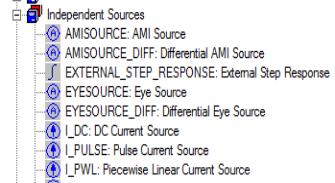
Both single-ended and differential versions
are available. In a schematic, double-click the Eye Source, or right-click the Eye Source and select Properties, to open the
Properties window.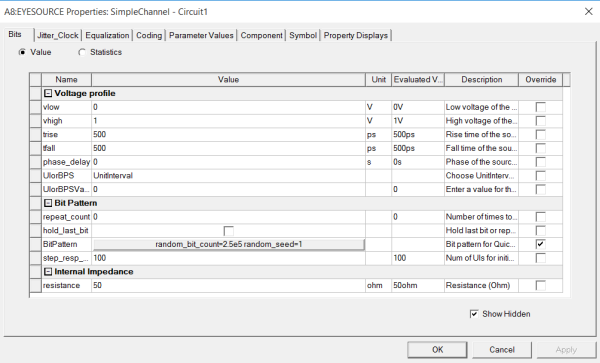
- For Quick Eye analysis, all Eye Source parameters apply except spread spectrum clocking.
- For VerifEye analysis, all parameters apply except the bit pattern generators and spread spectrum clocking.
- For Transient analysis, all parameters apply.
Bits Tab
The Properties window opens with the Bits tab displayed.
- The logic low, vlow. The default is 0 volt.
- The logic high, vhigh. The default is 1 volt.
- The rise time of input (trise). The default is 5.0e-10 seconds (500 picoseconds).
- The fall time of input (tfall). The default is 5.0e-10 seconds (500 picoseconds).
- The phase_delay for this source. The default is 0 seconds.
- The data rate: Click the UIorBPS drop-down to select UnitInterval or BitsPerSecond. Then Click the UIorBPS Value field to enter the unit interval size or number of bits per second.
- Click Bit Pattern to open
the window.
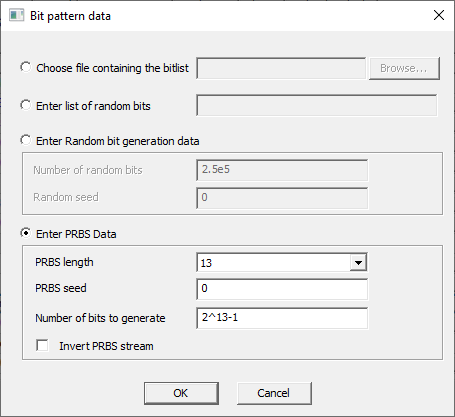
- Select ONE of the methods for generating the QuickEye or Transient bit pattern.
- To link to a file with the bit values, click Choose file, then Click the Browse window to locate and select the data file.
- To specify a bit list, click Enter list and type in the list of 1s and 0s.
- To have the Eye source generate a random sequence of bits, click Enter random, then enter the Number of random bits to be generated and the Random seed value. To guarantee that multiple Eye sources always use different random seeds, set the Random seed to -1 or -2. All Eye sources with setting -1 get sequential random seeds starting with 1000, the same on every run. All Eye sources with setting -2 get random seeds derived on the clock, changing from run to run.
- To generate a pseudo-random sequence of bit patterns of various lengths, click Enter PRBS Data. Select the length of the pattern, PRBS_length, (2 to 31 bits) on the drop-down menu. Enter a PRBS seed value, and specify the total number of bits to be generated. To invert the PRBS bit stream, check the check box at the lower-left of the PRBS Data group box.
Click OK to close the Bit pattern window and return to the Eye Source parameter list.
- To specify one or more repeats of the bits in the bit list, bit file, random sequence, or PRBS, set the repeat_count parameter on the Eye Source to the number of repeats. For more information, see Eye Source Bit Data in the Technical Notes.
- The Hold Last Bit check box is for sources with different bit sequences. The shorter bit list can be repeated or the last bit value can be held, until simulation ends. The default is to repeat (check box not checked).
Jitter_Clock Tab
The Jitter_Clock tab contains parameters to set up DCD, transmit jitter, and Spread Spectrum clocking.
- Duty cycle distortion: Click the DCDFractionorTime dropdown menu to select Fraction (the default) or Time. For Fraction, the DCD value is a decimal fraction of the UI between 0.0 and 1.0. For Time, the DCD value is a time between 0.0 and UI in seconds. A time unit such as ps may be used to set the DCD time. The default for both Fraction and Time is 0.
- For more information, see Duty Cycle Distortion in the QE/VE Technical Notes.
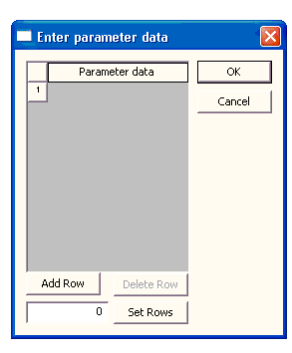
For txrj, txpj, and txuj, clicking in the Value field allows you to specify one or more values that allow you to configure the generation of multiple jitter sources.
- For the random transmit jitter (txrj) the value is the standard deviation for the Gaussian distribution. The default is 0 seconds.
- For the Periodic random transmit jitter (txpj) the value is the amplitude. The default is 0 seconds.
- For the Uniform random transmit jitter (txuj) the value is the amplitude. The default is 0 seconds.
- For the User-defined transmit jitter (txcj) the value is the name of the file containing the time (seconds and probability density function (PDF) data. There is no default.
- For more information on transmit jitter parameters, see Transmit Jitter in the Technical Notes.
With Transient Analysis, configure the Eye Source to enable the application of Spread Spectrum Clocking. (Please note that QuickEye and VerifEye do not use Spread Spectrum clocking.)
- Click the Value field of the SpreadSpectrum property to open the Spread Spectrum Data window.
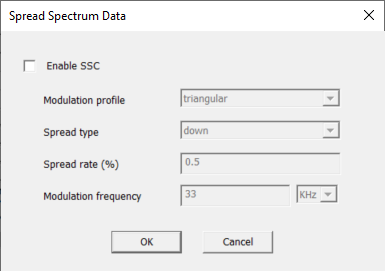
- Click the Enable SSC check box to activate the spread spectrum clock parameter fields.
- Select the Modulation profile: triangular (the default) or sinusoidal.
- Select the Spread type: down (the default), center, or up.
- Select the Spread rate (%), a percentage of the main clock frequency (which is calculated on the UI or BPS value in the Eye Source Bits tab). The Spread rate must be non-zero to enable Spread Spectrum clocking. The default is 0.5%.
- Set the Modulation frequency to a non-zero value to enable Spread Spectrum clocking. The default is 33kHz.
Coding Tab
The Coding tab contains parameters to set up bit encoding and select NRZ or PAM4 modulation.
- The do_encoding parameter controls 8b10b, 64b66b, 128b130b, or 128b132b encoding of the transmitted bit stream. The default is no encoding (None). Select 8b10b encoding, 64b66b encoding, 128b130b encoding, or 128b132b encoding on the drop-down menu. Please note that the do_encoding option is valid only when modulation=NRZ. do_encoding is ignored when modulation=PAM4.
- The modulation to be used. The default NRZ uses two voltage levels (binary data), PAM4 uses four voltage levels to represent two-bit symbols. See Coding.
- In the window, the coding parameter is labeled coding_PAM4_only as a reminder that it is ignored for NRZ transmissions. The coding parameter defines how digital bits are sent as analog waveforms in PAM-4 transmissions. In PAM-4, two bits ("00"/"01"/ "10"/"11") are transmitted at a time; in Gray coding, "00" is transmitted as "vlow," "01" as "vlow + (vhigh-vlow)/3," "11" as (vhigh - (vhigh-vlow)/3), "10" as "vhigh". In Linear coding, these voltage levels (smallest to largest) are used to transmit bits "00," "01,"10," and "11," respectively. The coding parameter has no effect in NRZ transmissions. In NRZ, one bit ('0' or '1') is transmitted at a time; '0' is transmitted as "vlow," and 1 as "vhigh."
Equalization Tab
The Equalization tab allows you to set up Feed-Forward Equalization in the Eye Source. To apply Feed-Forward Equalization, click FFE_data which opens the FFE Data window.