
Configure solver options on the Solver Options window.
Complete these steps to reach the Solver Options window.
-
Navigate to and select Layout > Layers to open the Edit Layers window.
-
Choose Select signal on the drop-down menu to enable the options in the Analysis area.
-
Check the Solver check box to enable Solver .
-
Click Solver to open the Solver Options window.
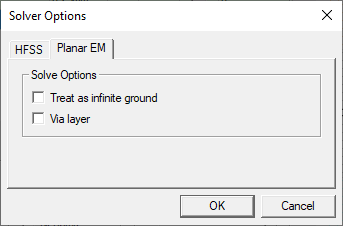
The Solver Options window contains two tabs, Planar EM and HFSS. The following options are available.
Planar EM
-
Treat as infinite ground — (signal layers only), causes the selected signal layer to be modeled as an infinite ground in the Planar EM field solver.
- Via layer — (signal
layers only), treats any objects on the layer as vias: objects that
are meshed differently than other objects in the design for improved
simulation efficiency. Control how objects on via layers are
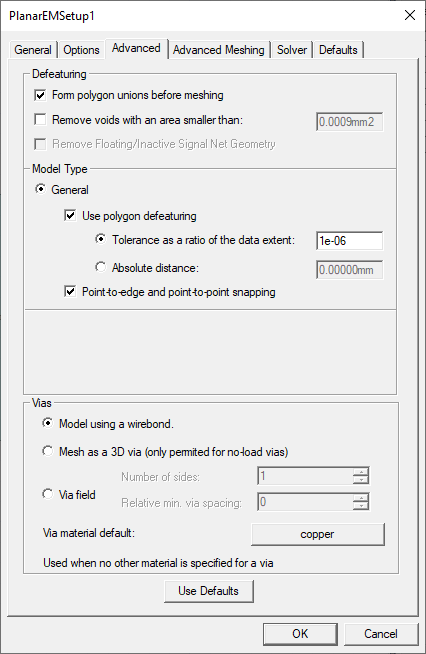
meshed on the Advanced tab of the Add Planar EM Solution Setup window.
For example, after importing a GDSII or DXF file that contains a layer with many small circles that define a large number of vias, define a via layer so the vias are meshed in an efficient manner. To do this, follow these steps.
Set the following properties in the Edit Layers window:
From the Edit selected area, make a selection on the Material drop-down menu.
From the Edit selected area, enter a Thickness in the field.
Select the via layer
Click Apply and Close.
From the Project Manager window, expand the Project Tree. Then right-click [Active Design Folder] and select Add Planar EM > Solution Setup to open the PlanarEMSetup1 window.
From the Advanced tab, select whether to Model using a wirebond (chosen by default), Mesh as a 3D via (only permitted for no-load vias), or Via field.
HFSS
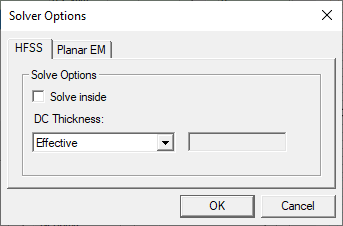
- Solve inside — enables all objects in the layer to have "solver inside" attribute for HFSS solver. It is possible to perform solve inside on an object-by-object basis. See HFSS 3D Layout Properties for more information.
- DC Thickness — Controls how DC thickness
is calculated for the conductor lumps on the layer.
- Effective: Calculates as twice the volume/surface area
- Layer: Use layer thickness
- Manual: Use user specified value