
The logic_in Pin property sets the connection for the incoming data source. Click the logic_in Value field button to open a window. Select Internal Source to set up an internal data source (See Eye Source Parameters.) Click Select Net to display a list of nets to connect to the logic_in pin.
Eye Source Parameters When the IBIS buffer logic_in Pin property is set to Internal Source, the Property list includes selected Eye Source parameters to set up the internal data source.
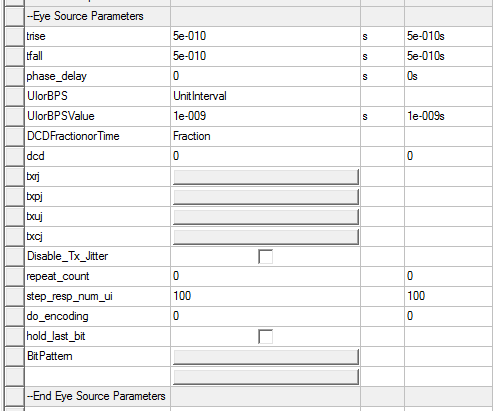
With the following exceptions, these parameters are documented in the topic Add a QuickEye Source to a Schematic
Note:
- The resistance parameter on the Eye Source is not available with IBIS sources.
- The vlow parameter on the Eye Source is not available with IBIS sources. IBIS sources must use 0V as the logic low voltage.
- The vhigh parameter on the Eye Source is not available with IBIS sources. IBIS sources must use 1V as the logic high voltage.
- The FFE parameter (Feed-Forward Equalization) on the Eye Source is not available with IBIS sources.
- For IBIS, the phase_delay is a pure delay added before the bit pattern starts running.
- The Disable Tx Jitter check box is available only on IBIS buffers. When this check box is On (checked), transmit jitter calculations are disabled. Transmit jitter settings in the properties list are not changed.