
An IBIS buffer imported as a single component has a rectangular schematic symbol with terminals for the imported pins in the IBIS model. When no individual pins are selected, Nexxim imports all eligible pins. When the IBIS component definition does not include a [Package Model], the [Package Model] option is deactivated, and the power and ground pins are not available for import. Then you can connect the pins to signals in the schematic. The component expects power to be supplied as specified by the power parameter on each pin. Any [Pin Mapping] in the component definition is ignored. Nexxim uses the [Pin] or [Package] data (selected by pkg_selector property) to instantiate RLC parasitics between the die-side and the board-side nodes.
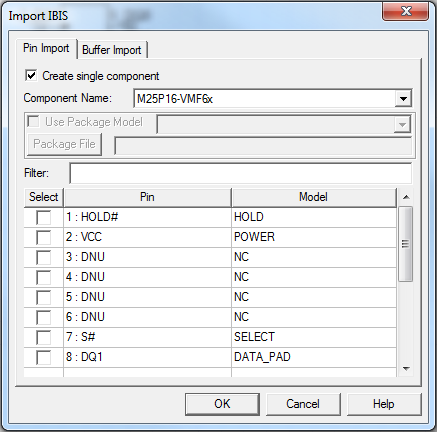
When you have identified the IBIS library file in the Import Components window, the Import IBIS window appears.
To import a single IBIS component without a [Package Model] and importing all component signal pins:
- Click the Create single component check box at the top of the Pin Import tab.
- From the Component Name field, use the drop-down menu to select the component on the IBIS file.
- Do not select any individual pins. With no individual pins selected, Nexxim imports ALL the signal pins on the component definition.
- Click OK to create the component and add it to the Definitions > Components listing in the Project Tree.
(See Power Nodes in the IBIS File Import Technical Notes for details on the methods for supplying power to imported IBIS components. See Package RLC Parasitics in the technical notes for details on support for RLC parasitics in IBIS components. The next step is to place the IBIS components in the schematic.