HFSS Meshing Method Tab
From the Project Manager window, right-click on a design and select Design Settings to open the Design Settings window and click the HFSS Meshing Method tab.
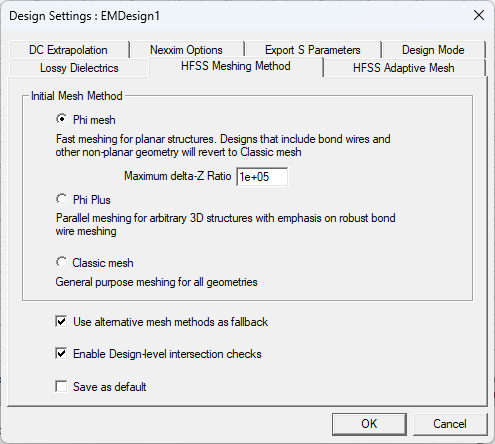
- Phi mesh is a layout-based meshing technology, available in the HFSS 3D Layout interface. This advanced meshing technology is capable of rapidly generating an initial mesh ensuring faster simulations that can be further accelerated and enhanced by using high performance computing.
- Phi Plus works with all types of layout models, particularly those containing bondwires, solder balls, or 3D Components (MCAD). Phi Plus generates an initial mesh using high performance computing (HPC).
- Classic mesh uses a Bowyer algorithm to create compact meshes for the model with very large length scales. It represents the model very accurately.
- Use alternative methods as fallback allows the solver to use an alternative mesh method if your selected mesh method (Phi) fails to generate an initial mesh. This option is enabled by default.
- Enable Design-level intersection checks searches for and notifies you when a design has intersecting geometries.
- Select Save as default and click OK to save the causal material setting to the registry.
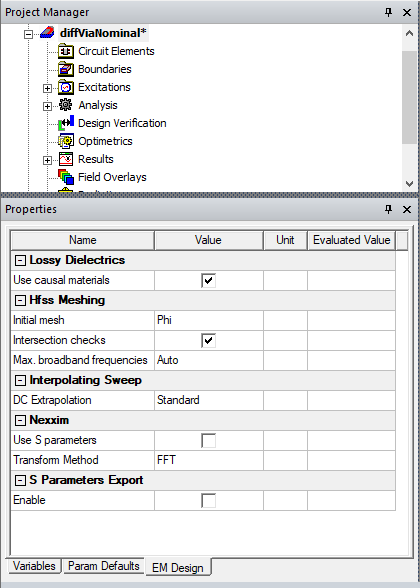
Also view and edit design settings by selecting a design using the EM Design tab of the Properties window.