Enable Auto Select Direct/Iterative
In order to reduce the need for user intervention, speed up the solution process, and minimize solver failure, HFSS automatically chooses whether to use the direct (i.e., default) or iterative solver for each pass. Depending on a wide range of parameters (e.g., geometry, mesh size and quality, basis order, the number of excitations, et cetera), the performance of the direct and iterative solvers can vary significantly. The direct solver provides a multi-frontal (MF) approach and is invoked by default if the matrix is not well-conditioned for an iterative solution. The iterative solver significantly reduces memory usage, and it can also reduce solution time for large simulations. Enabling Auto Select Direct/Iterative could therefore potentially improve the speed of the simulation while maintaining accuracy.
Enable the Auto Select Direct/Iterative
From the Solution Setup window, select the Options tab. Then select Auto Select Direct/Iterative on the Solution Options area.
The Iterative Solver is not available for zero order basis solutions.
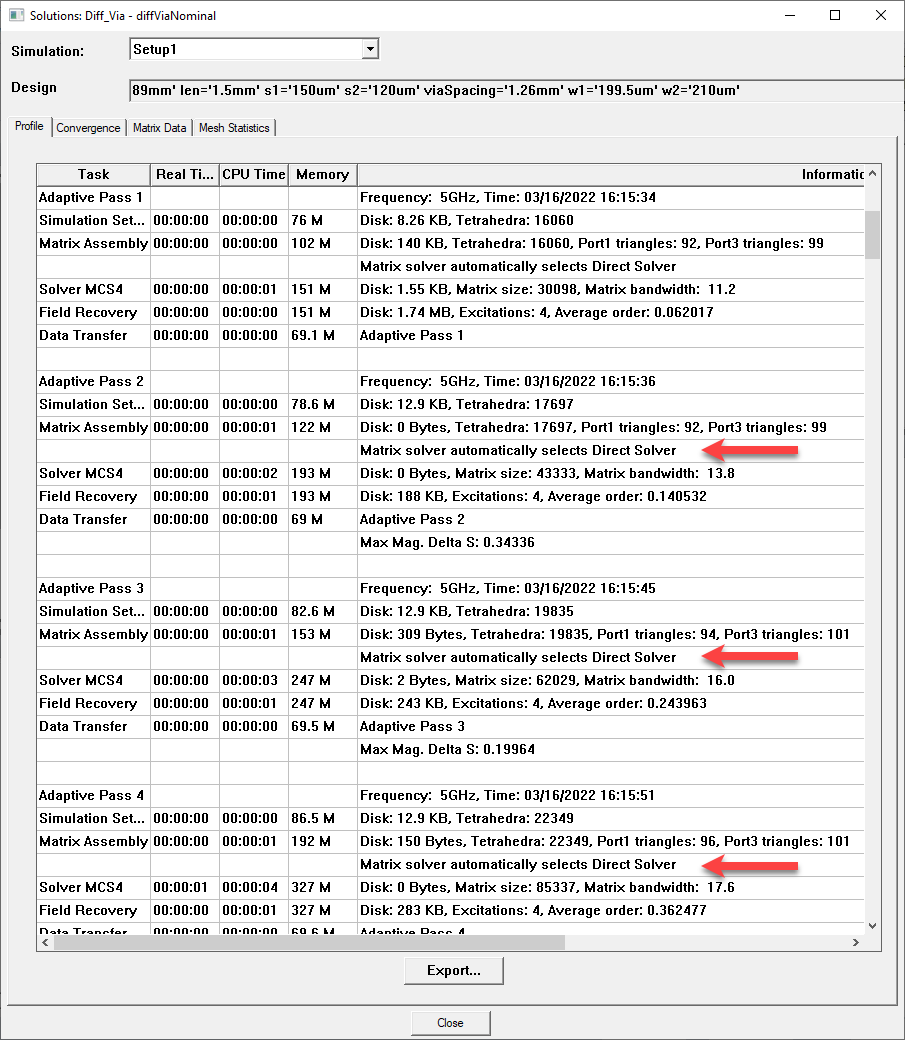
During and after analysis, the solver chosen for each pass and sweep is viewable on the Solutions window > Profile tab.