Changing the Reference Surface
HFSS 3D Layout edge ports are usually single-terminal excitations, in which the negative polarity reference for a port automatically defaults to the closest signal layer (with geometry) or negative layer, above or below the primary terminal.
If the model has a two-terminal excitation, you can override this default behavior by designating the voltage reference for the port. Typical applications include referencing one signal line to another (a differential pair,) or referencing a trace to a finite negative signal, either in-plane (a CPW) or out of plane (a finite negative signal antenna.) Complete these steps to change a port’s voltage reference.
- Select the edge on a signal layer that you want to be the reference surface.
- Right-click the excitation in the project tree and select Add Reference.
The reference is changed to the edge you selected.
Selecting a Dual Reference
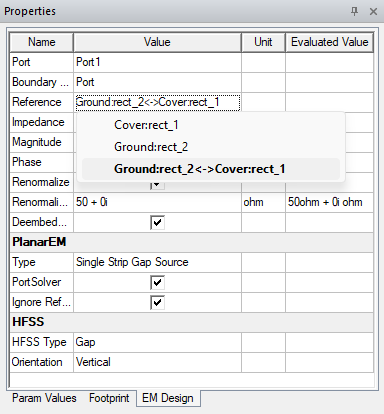
If a lumped port abuts two planes (i.e., two possible reference surfaces), users can select both surfaces. With the port selected, navigate to the Properties window. Then select the dual reference option from the Reference drop-down menu (i.e., the dual reference option lists both reference surfaces with a <-> demarcation between them).