
There are multiple ways to access the Naming Convention window:
- From Tools > Options > General Options > Layout Editor.
- From the General Options icon on the Desktop tab.
- Through the SIwave Workflow Wizard, using either Configure DC Drop Analysis or Configure PI Analysis.
Only relevant naming convention types appear (e.g., if you access this window through Configure PI Analysis, only Pin Group Port naming conventions are editable). Access Naming Conventions through General Options for the greatest number of options.
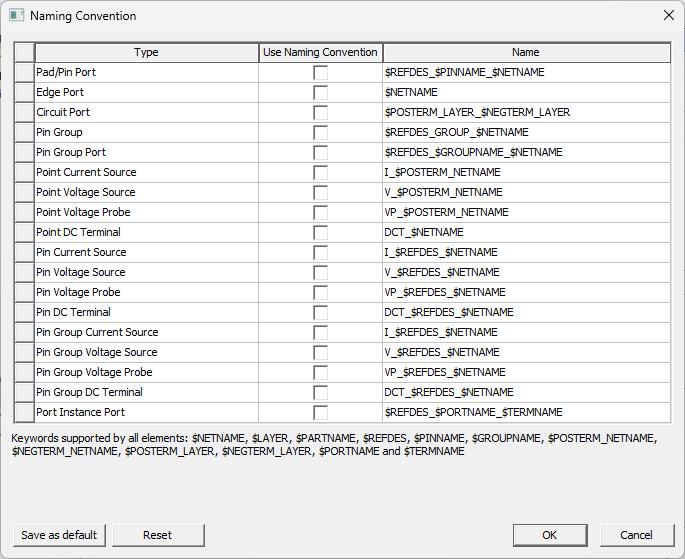
The Naming Convention window lists the types of naming conventions that are editable:
-
Selecting a row displays its supported keywords underneath the list.
-
Double-click in the Name field to type your preferred naming configuration using the supported keywords.
-
Select a row's Use Naming Convention check box to apply the setting.
-
Click Save as Default to make your changes the default. Click Reset to restore default settings.
Example Naming Convention - Port Instance Port
HFSS 3D Layout has implemented naming convention support for multi-terminal ports exposed from MCAD (i.e., Port Instance Port). Assuming the convention is enabled, when a port is attached to an HFSS dynamic link or component (e.g., with Create Ports on Component) the following default conventions are used.
Single port:
$REFDES_$PORTNAME_$TERMNAME
Multi-terminal ports:
$REFDES_$PORTNAME_$TERMNAME:T1
$REFDES_$PORTNAME_$TERMNAME:T2
Example — S1_Port1_T1:T1, S1_Port1_T2:T2
When a port name (e.g., PortN) is a prefix for a terminal name, the prefix is removed (e.g., if a terminal is named Port1_T1, Port1 is removed, so that its port name will be S1_Port1_T1 rather than S1_Port1_Port1_T1).
Users can also modify the assigned name for single and multi-terminal ports by adding additional keywords, such as the following: $REFDES_$PORTNAME:T$TERMINDEX
Example — S1_Port1:T1, S1_Port1:T2
Only the first part of the name is used for single terminal ports (i.e., the half of the name preceding the colon).
Example — $REFDES_$PORTNAME
If the specified convention is given a name without a colon (e.g., $REFDES_$PORTNAME), :T1, :T2, et cetera are automatically appended to the name to validate the multi-terminal port names.