
Workbench Data Integration Overview
Ansys EM data-integrated applications can reside on a Workbench Project Schematic, as shown.
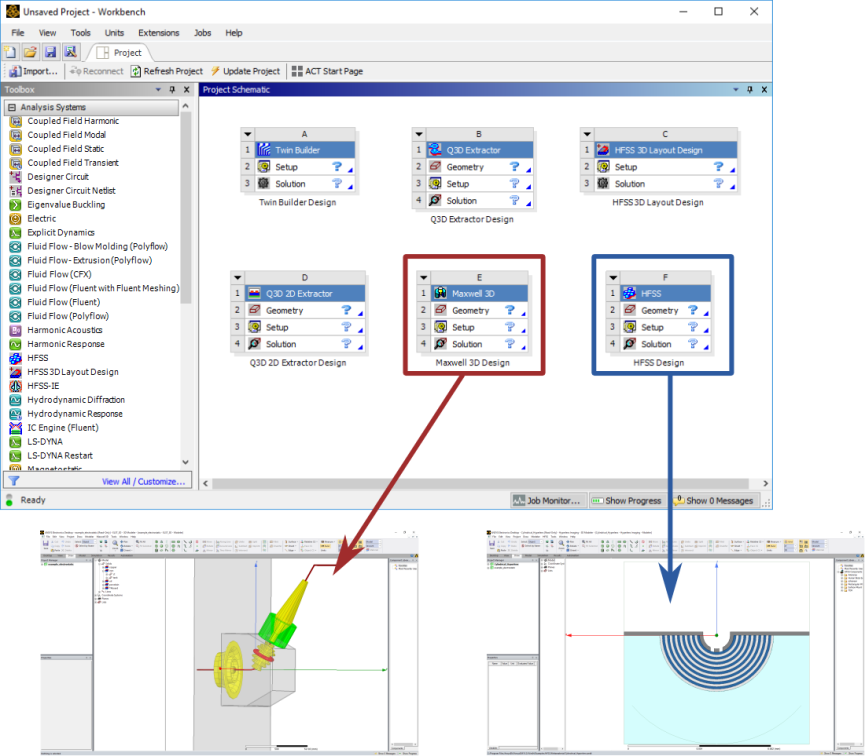
Objects placed on a Workbench Project Schematic (such as instances of Ansys Electromagnetics projects) are referred to as systems. RMxprt, Circuit, HFSS 3D Layout, and Twin Builder appear on Workbench Project Schematics as systems with two cells: Setup and Solution. HFSS, Maxwell, Q3D Extractor, Icepak, and Mechanical add an additional Geometry cell.
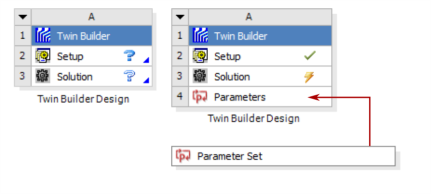
If you invoke Ansys DesignXplorer to use variables for refining a design, a Parameters cell is added, with a link to the associated Workbench Parameter Set. Refer to the Ansys Workbench help for details on working with systems, cells, and parameter sets.
All Ansys Electromagnetics desktop products integrate with Workbench commands, services, and DesignXplorer in a similar manner. Some capabilities include:
- Adding new analysis systems
- Importing existing desktop projects
- Editing models
- Analyzing models
- Performing parameter studies
- Scripting
In addition to these major features, Workbench can archive, save, back up, duplicate, and delete Ansys Electromagnetics projects used in a Workbench project. Progress information and messages from integrated Ansys Electromagnetics projects are also displayed in Workbench.
Detailed information for using these operations can be found in the Ansys Workbench help.