
Named Expression Library
The named expression library in the Fields Calculator provides a way to conveniently
calculate frequently used quantities. Some standard field quantities have been pre-defined and are always accessible. These field quantities
have a gray background color and cannot be deleted. You can assign a name to the top entry of Data Stack and add it in the Named Expression
list. The library comes with several predefined expressions. Once these new expressions
are added/loaded, they are available through
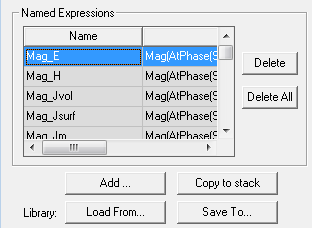
You can combine calculator Input commands in any legal fashion, including complex quantities, to produce new named expressions.
- Adding named expressions to the Fields Calculator expression library
- Copying named expressions to the Calculator Stack
- Saving named expressions to a Personal Library
- Loading named expressions
- Deleting named expressions that you added
To add a named expression of your own to the Fields Calculator list:
- In the register display area, create the expression by using the calculator Input commands.
You can combine input commands in any legal fashion, including the use of complex quantities. If you select an input command that is not legal for a current operation, you receive an error message.
- When you finish creating the expression, click Add in the Named Expressions panel.
The Named Expression dialog box appears.
- Type a name for the expression in the Name text box.
The new expression is added to the list of named expressions.
To copy a named expressions to the Calculator Stack:
- You can scroll through the list, select any desired named expression, and click Copy to Stack to move it to the calculator stack, where you can use it to generate calculated outputs.
To delete named expressions that you added:
When the Named Expression list contains one or more user-defined expressions, the Delete and Clear All buttons are active. (You cannot delete or clear the predefined named expressions.)
- To delete the selected user-defined named expression, click Delete. To delete all user-defined named expressions, click Clear All.
To save one or more named expressions for the Fields Calculator to a personal Library:
- Click Save To on the Fields Calculator.
The Select Expressions for Saving dialog box displays.
- If any new named expressions exist, you can select one or more to save to a file.
- Specify a file name and click OK to save the file.
To load named expressions for the Fields Calculator from a personal library:
- From the Fields Calculator, click Load From.
This displays a file browser that you can use to search for existing .clc files.
- Select the library to load and click OK.
This loads the expression file you have selected.