
Welcome to EMIT Help
The Electromagnetic Interference Toolkit (EMIT) design type in Ansys Electronics Desktop provides system simulation for predicting and mitigating radio frequency interference (RFI) in electronic devices. EMIT provides:
- A framework for managing all of the information that is required to define complex radio frequency (RF) environments
- A powerful computation engine for computing interference throughout the entire scenario including higher-order effects such as intermodulation products
- Dynamic diagnostic and result views for rapid analysis of the simulation results to quickly and intuitively identify the "root-cause" of all interference problems and to visualize interference signal paths
EMIT is designed to work with different types of input data that describe the RF environment to be modeled, thus enabling RFI simulations to be performed with the data that is available to the analyst.
EMIT's power as a simulation tool for predicting RFI between RF systems lies in its unique multi-fidelity approach to modeling complex scenarios using whatever information is available. Lower fidelity models in EMIT for transmitters (Txs) and receivers (Rxs) are based on typically available high-level radio specifications, such as maximum spurious emission levels (for Txs), minimum discernible signal (for Rxs), and RF & IF filter bandwidths and frequencies. EMIT uses these RF system specifications to create radio models that are then combined with wideband antenna-to-antenna coupling data obtained from HFSS or HFSS 3D Layout to compute the interference metrics (EMI Margin, Sensitivity, Desense, and Availability) for the complete system. The interference metrics provide the analyst with an evaluation of the level of interference in each Rx as well as the root cause of the interference that is easily identified using EMIT's integrated diagnostic tools.
As more information is obtained about the performance of the Tx and Rx systems, it can be introduced into the existing lower fidelity EMIT models in order to yield more accurate representations of the radios in EMIT. That, in turn, leads to more accurate EMI Margin predictions. At the highest level of fidelity, EMIT can use models derived from measurements that characterize the Tx and Rx systems over a wide bandwidth, or from simulations of the entire radio performed in sophisticated nonlinear RF circuit simulators like Ansys Nexxim. These types of high fidelity models capture completely the complex wideband behavior of the radios, leading to highly accurate EMI Margin predictions within EMIT.
Detailed information on the underlying methodology and equations used by EMIT can be found in the EMIT Theory section of the help.
Migrating from EMIT Classic
EMIT has existed as a standalone product ("EMIT Classic") for many years. To help facilitate the transition to EMIT in EDT, several toolkits have been created that will import EMIT Classic projects and libraries into the new format. For details on using these toolkits, see Importing EMIT Classic Projects and Libraries.
Tutorials
Several tutorials have been designed to introduce users to basic RFI concepts and to help familiarize them with EMIT's functionality. These tutorials start with the creation of simple RFI scenarios and progressively add more complex capabilities and features.
The Examples directory for EMIT also includes the following pre-built examples:
- AH-64 Apache Cosite
- Cell Phone RFI Desense
To access these files from within Electronics Desktop:
-
Click File > Open Examples and open the EMIT folder.
-
Select either AH-64 Apache Cosite.aedt or Cell Phone RFI Desense.aedt.
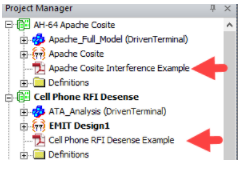
After you load the project, the example is shown in the Project Manager, along with a detailed PDF guide that is accessible from the Project Manager window:
Additional Resources
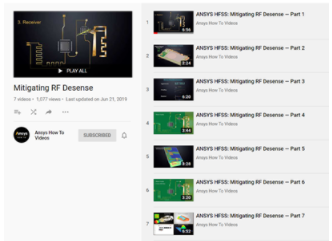
An EMIT-specific video tutorial titled Mitigating RF Desense can be accessed from the Ansys YouTube channel. This tutorial corresponds to the material provided in the Examples installation directory (C:\Program Files\AnsysEM\v242\Win64\Examples\EMIT\Tutorials). The IoT_Board_Desense.pdf document in this directory also provides an overview of this example.

|
View Ansys Electronics videos on YouTube. |

|
View EMIT PDFs. |