
Sampling
The Sampling node defines the operational channels (frequencies) to be considered in the EMIT simulation.
Each Radio in EMIT may be capable of operating on a very large number of bands and channels. In most cases, it is not desired to run the EMIT simulation for all possible available channels that a radio is capable of operating on. There are two primary reasons for this.
- First, in a given situation, a radio may not be used operationally on all available channels. For example, a multi-band radio installed on a vehicle may only be used on one of the bands that it is capable of. In other words, in a given situation it operates only on a subset of the available channels. In this case one would want to analyze only the channels that are to be used, not all possible channels available in the Radio.
- Secondly, many radios are capable of being tuned in very small increments, which can result in a very large number of available channels that the radio can be operated on, and analyzing every single channel can lead to long simulation times in EMIT and an enormous amount of data to pore over after the simulation is complete.
For these reasons it is usually not desirable or necessary to simulate all available channels. The Sampling settings provide a way to define the particular frequency ranges to include in the simulation as well as how to sample the available channels within those ranges.
The property settings for Sampling are found in the Radio configuration dialog by selecting the Sampling node as shown below:
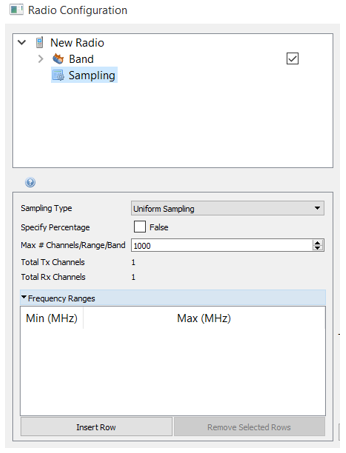
These settings define which channels (frequencies) available in the Sampling to include in the EMIT simulation. The way this works is that the Frequency Ranges settings define ranges of frequencies to be included. EMIT automatically finds all channels within these ranges that the radio has defined. These channels can all be included in the analysis, or they can be sampled based on the sampling settings defined.
Sampling Type: Defines how the channels available in the defined Frequency Ranges are sampled for the EMIT simulation.
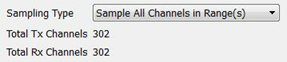
Sample All Channels in Range(s): This setting includes all channels within the defined Frequency Ranges. If no Frequency Ranges are defined, EMIT uses all channels available in the Radio's Bands. The total number of Tx and Rx channels that are included in the analysis are shown in the non-editable Total Tx Channels and Total Rx Channels fields shown below.
Random Sampling: This setting uses a uniform distribution to generate a random sampling of all channels within the defined Frequency Ranges. If no Frequency Ranges are defined, EMIT samples from all channels available in the Radio's Bands. The number of channels to be included can be limited by specifying a Max # Channels/Band or by defining a percentage of the available channels to include in the random sampling. The Seed setting provides an integer random number seed for EMIT to generate the random sampling. This allows the "random" analysis that is performed to be reproduced.
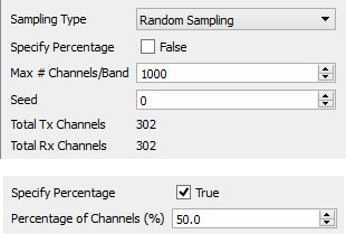
Consider a case where a Configuration has a single Band with 100,000 available channels. If we set the Max # Channels/Band to 1,000, EMIT includes a random sampling of 1,000 of the available 100,000 channels in the simulation. If we choose Specify Percentage and enter 50%, EMIT includes a random sampling of 50,000 of the available 100,000 channels in the simulation.
If the number of available channels is less than the Max # Channels/Band specified, all channels are included in the simulation.
Uniform Sampling: This setting includes a uniform (equally spaced in frequency) sampling of all channels within the defined Frequency Ranges. If no Frequency Ranges are defined, EMIT samples from all channels available in the Radio's Bands. The number of channels to be included can be limited by specifying a Max # Channels/Band or by defining a percentage of the available channels to include in the uniform sampling.
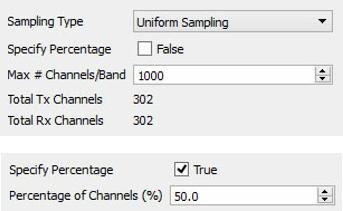
Consider a case where a Sampling has a single Band with 100,000 available channels. If we set the Max # Channels/Band to 1,000, EMIT includes a uniform sampling of 1,000 of the available 100,000 channels in the simulation. If we choose Specify Percentage and enter 50%, EMIT includes a uniform sampling of 50,0000 of the available 100,000 channels in the simulation.
If the number of available channels is less than the Max # Channels/Band specified, all channels are included in the simulation.
Specify Percentage: If enabled (True), EMIT samples this percentage of the total available channels.
Max # Channels/Band: Maximum number of channels to be included within the defined Frequency Ranges for each Band that is enabled for this Radio.
Total Tx Channels: Non-editable value showing the total number of Tx channels to be included in the simulation based on the defined sampling.
Total Rx Channels: Non-editable value showing the total number of Rx channels to be included in the simulation based on the defined sampling.
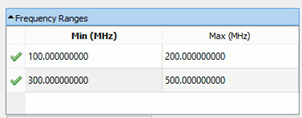
Frequency Ranges Folder: When expanded, a table is available for defining frequency ranges to be considered for inclusion in the EMIT simulation. EMIT finds and uses all available channels within the defined Frequency Ranges. If no Frequency Ranges are defined, EMIT uses all channels available in the Radio's Bands. In the example shown below, EMIT includes all channels from those available that fall within the 100-200 MHz and 300-500 MHz ranges.
Insert Row: Add a row to the Frequency Ranges table.
Remove Selected Rows: Delete selected rows from the Frequency Ranges table.