


The SPH Thermal Model allows the user to enable heat exchange between the SPH elements and particles, boundaries and other SPH elements. After enabling the thermal model, the following parameters need to be defined by the user.
Fluid Material:
Thermal Conductivity: Defines the thermal conductivity of the SPH elements.
Range: Positive Values
Specific Heat: Defines the specific heat of the SPH elements.
Range: Positive Values
Inlets:The fluid mass injected into the domain is defined according to the injection type set. This can be either a Volumetric Inlet or a Fluid Inlet.
Temperature: Defines the temperature of the SPH elements.
Range: Positive Values
Set up your simulation as you normally would, ensuring all of the following:
During the Set Simulation-Wide Parameters step, on the Physics tab, select the Enable Thermal checkbox.
The Cleary model for heat transfer model is automatically selected.
During the Add and Edit Geometry Components step, on the Geometry sub-tab for each of your wall components, set what you want for Thermal Boundary Type and Temperature.
If your simulation also involves DEM particles: During the Add and Edit Particle Sets step, on the Particle tab for the Particle set(s) you want affected by Thermal, ensure that on the Composition sub-tab for any particles you have selected Multiple Elements from the Composition list, that you also set the Conductivity Ratio parameter to the value you want.
During the Modify Material Properties step, on the Materials tab set all of the following parameters for the fluid material:
Thermal Conductivity
Specific Heat
During the inlet (SPH elements and DEM particles) definition step, ensure you have defined a temperature value greater than 0 K.
Process your simulation as you normally would.
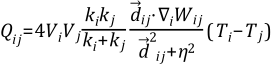
The SPH Thermal Model evaluates heat exchange between the SPH elements and other elements, boundaries and particles present in the simulations. For each of these interactions, a different implementation of the heat exchange was applied.
Equation 2–72 presents the formulation for
the heat exchange between SPH elements[4], where given 2 elements
(i, j), the heat exchange  between them is:
 | (3–1) |
where:
 is the volume associated to each element.
 is the thermal conductivity associated to each element.
 is the temperature associated to each element.
 is the distance vector between elements i and j.
 is the gradient of the kernel function with respect to the
coordinates of element i.
 is a parameter included to avoid singularities.
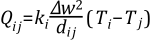
For the calculation of the heat exchange between an SPH element and a boundary triangle
another formulation (presented in Equation 2–73)
is used, in which the heat exchange between element i and boundary triangle
j, , is given by:
 | (3–2) |
Where:
 is the thermal conductivity of element i.
 is the initial SPH elements separation.
 is the distance between element i and boundary triangle j.
 is the temperature for the element or boundary triangle.
Finally, if an SPH element is linked to a DEM particle their temperatures are considered the same and being equal to the temperature of the particle at any time. These linked elements do not exchange heat with the boundaries; the thermal transfer occur between the SPH elements since the ones that are linked to DEM particle have they temperature described. The heat transfer can then be used as a source term the calculate the thermal transfer between the DEM particles and the SPH elements.