Fixed geometry designs
For fixed geometry designs, you need to convert the design constraints into material property limits using the Engineering Solver. To use the performance index finder, you need to have a design with a free geometric variable.
If there is no free variable, the design is a fixed geometry design, with a fixed volume. In these situations, you need to convert the design constraints into material property limits using the Engineering Solver. Use a chart to select materials based on the properties you want to optimize.
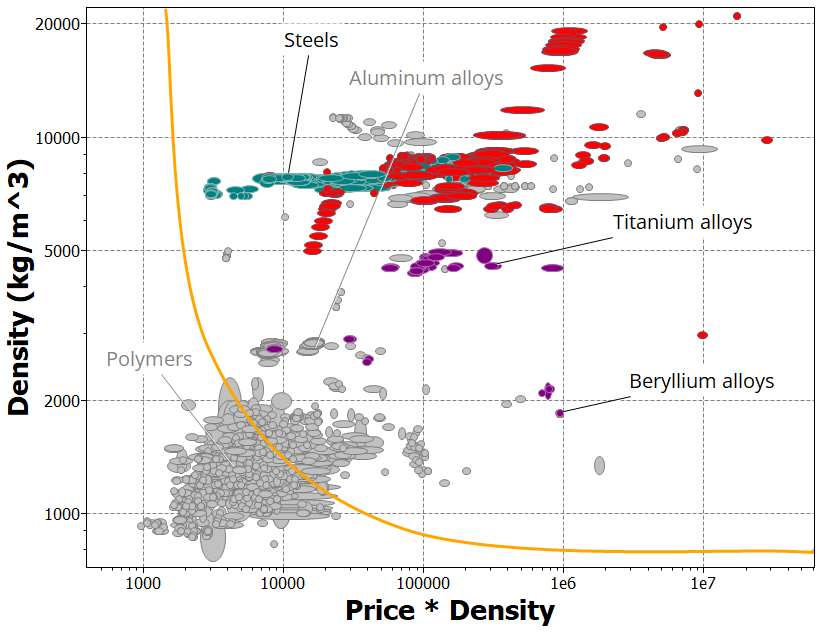
For example, in a stiffness-limited design with no free variable (fixed volume), to minimize mass and cost, create a chart of density (or mass per unit volume) vs. price*density (or cost per unit density).
-
Create a chart, and on the axes, plot the properties you want to optimize in
the design.
For example, for a stiffness-limited design with no free variable (fixed volume), and minimizing mass and cost, plot density (or mass per unit volume) vs. price*density (or cost per unit volume). On the chart (below), the materials shown in gray failed the limit stage. The orange line is a trade-off curve.