Exercise 3: Calculate Limit values using the Engineering Solver

Use the Engineering Solver to convert engineering requirements into material properties, and then use these properties to filter materials in a Limit Stage.

Design requirements are often specified in terms of geometry, loading, and maximum deflections. The Engineering Solver tool converts these engineering requirements into material properties, which can then be applied in Limit Stage to screen for suitable materials.

  1. Open the Engineering Solver.
    Click Solver on the main toolbar.
  2. Select the loading geometry Beam in bending.

    This model estimates the minimum strength and stiffness values required for a beam with the specified geometry and load conditions.

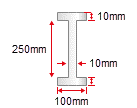
  3. Set up the geometry for an I-beam with the following cross-section dimensions:

    Use the Cross-section list to select I-section. Enter the following dimensions and use the lists at the end of each line to select the correct units:

    Breadth, b = 100 mm; Depth, d = 250 mm; Thickness, t = 10 mm; Web thickness, tw= 10 mm; Length, l = 5 m.
  4. Set up the design parameters for a cantilever with an end load of 5kN.

    Load condition = Cantilever End load; Load = 5 kN; Safety factor = 1.5; Maximum deflection = 50 mm.

    The results will automatically populate. You should see that the minimum required Young’s Modulus is 133GPa and the minimum Yield Strength is 108MPa. You can change the units for the results using the adjacent lists.

    Keep the Engineering Solver window open.

  5. Select materials based on the results from the Solver tool.

    Create a new Limit stage using subset All bulk materials, and enter the minimum Young’s modulus and Yield strength (elastic limit) from the Engineering Solver.

    Make sure that the results units in the Engineering Solver and Limit Stage match. Change the results units in the Engineering Solver if they do not match those in the Limit Stage.

    Example results: Aluminum nitride, Alumina, Beryllium, Bronze, Carbon Steel...

As you can see, a large number of results are returned. Further selection stages can be applied to narrow down the list of potential materials (for example, setting a maximum Price).