
Transfer Characteristics

In the Transfer Characteristics dialog box, each tab corresponds to one transfer characteristic curve, that is, Ic=f(Vge) at a specific temperature. These characteristics are obtained from the typical transfer characteristic curves supplied by the manufacturer as shown in the following example.
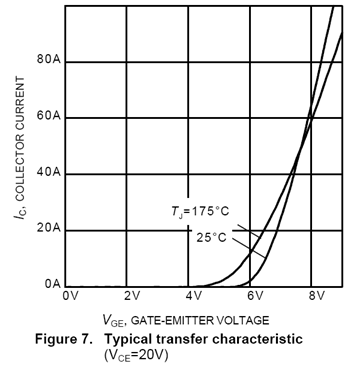
If the transfer characteristics are not supplied in the datasheet, you can usually extract enough points from the output characteristics to get a good fit. To do so, one takes the current Ic at the highest possible VCE (when the current is saturated, that is, as it ceases to increase as VCE is increased) for at least three different values of VGE.
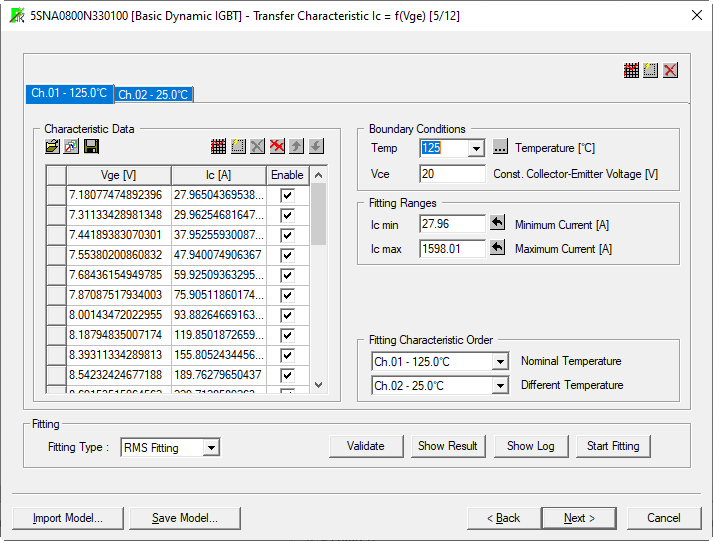
- Use the Characteristic Data section to enter curves or work with the data for a specific curve selected on the tabs.
- Use the Boundary Conditions section to specify the junction temperature (Tj) and the Collector-Emitter Voltage (Vce) associated with each curve.
- Use the Fitting Ranges section to specify the range of the data to use when performing the fitting. Initially, the values populate with the maximum and minimum current values from the curve.
- In the Fitting Characteristic
Order section, two sets of transfer characteristic data must be
specified. The transfer characteristic under nominal junction temperature
is mandatory, while the characteristic at a different temperature is
used to calculate correction coefficients when the junction temperature
of the device is different from the nominal temperature. If the data
for the latter are not available, select Not Used option from the drop-down menu.
Note:
In some cases, data sheets provide graphs for the transfer characteristic that far exceed the regular range of working conditions of the IGBT. This has a negative influence on the quality of the curve fitting by making the fitting process to focus on the high current area. Therefore, the data points used for the fitting of the transfer characteristic should be limited to approximately three times INOM.
- In the Fitting section, you perform the fitting of the model to the characteristic curve data and validate the results. For information about the specific fitting type see Fitting Types of Static Characteristics.
For more information, click an area on the image below.
When finished, click Next to continue characterizing the device (Output Characteristic).