Setting Timers
Timers can be set on virtual desktops and HPC clusters that have been started but are experiencing no or low activity. Timers can be set to automatically stop the resource after a specified period of inactivity. You can also set timers that sign out inactive or disconnected users.
Timers are an excellent way to control costs, as resources that are left running continue to incur charges even if they are not being actively used.
To set timers on a resource:
-
Go to the project space containing the resource.
Click the resource to display its details, then select the Shutdown timers tab.
The timers that are available depend on whether the resource is a virtual desktop or an HPC cluster. On a Windows virtual desktop, for example:
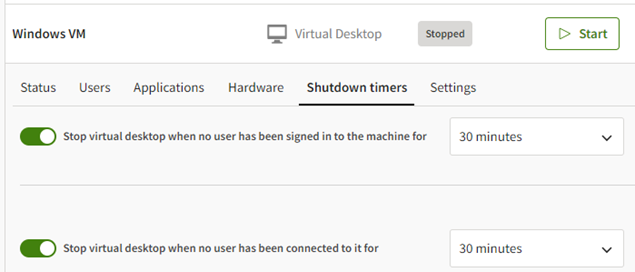
To enable or disable a timer, click its toggle button. If enabling a timer, select the desired timeout period.
Timer options are described below.
Windows Virtual Desktop Timers
Stop virtual desktop when no user has been signed in to the machine for. The maximum number of minutes that the virtual desktop can remain running when no user is signed in to the machine. (When a user connects to a virtual desktop, they are signed in to the machine so that they can use it.)
This timer is activated when no users are listed on the Users tab in the virtual desktop details. When the user list has been empty for the specified period of time, the virtual machine is stopped.
Note that users remain signed in to a virtual machine after disconnecting from a session unless the Sign out user who has been disconnected for timer is set.
Stop virtual desktop when no user has been connected to it for. The maximum number of minutes that the virtual desktop can remain running after all users have disconnected from it. (A user disconnects from the virtual desktop by closing their virtual desktop session.)
This timer is activated when every user listed on the Users tab in the virtual desktop details has a status of 'Disconnected'. When the list has been in this state for the specified period of time, the virtual desktop is stopped.
Sign out user who has been offline for. Signs a user out of the virtual machine after a specified period of inactivity (plus an added 2 minutes of courtesy time provided by Windows).
Sign out user who has been disconnected for. Signs a user out of the virtual machine after they have disconnected from the virtual desktop session. If this timer is not set, users remain signed in to the virtual machine after being disconnected.
Linux Virtual Desktop Timers
Stop virtual desktop when no user has been signed in to the machine for. The maximum number of minutes that the virtual desktop can remain running when no user is signed in to the machine. (When a user starts a session, they must sign in to the machine so that they can use it.)
This timer is activated when no users are listed on the Users tab in the virtual desktop details. When the user list has been empty for the specified period of time, the virtual machine is stopped.
Stop virtual desktop when no user has been active for. The maximum number of minutes that the virtual desktop can remain running when no users are actively using it.
This timer is activated when no actions have been performed by any signed-in user for the specified amount of time.
Sign out user who has been idle for. Signs a user out of the virtual machine after a period of inactivity. If the user has not performed any actions in the specified amount of time, and it is the user's only session, the user will be removed from the Users tab in the resource details.
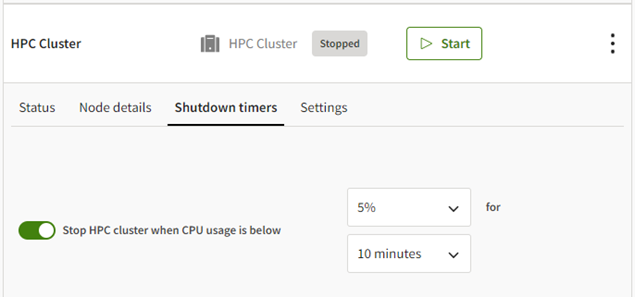
HPC Cluster Timer
Stop HPC cluster when CPU usage is below. Shuts down the cluster when low CPU usage is detected. First, define the threshold for low usage by specifying a percentage of CPU usage. Then, specify the shutdown interval by selecting the number of minutes after user low CPU usage detected.