CreatePagePort (Schematic Editor)

Creates a PagePort.

UI Access Draw > Page Connector
Parameters
Name Type Description
<PagePortProps> Array

["NAME:PagePortProps"],

["NAME:Attributes",

"Page:=", int, _ // [Opt=1] Page number (one-based)

Note: Page 1 always exists

"X:=", double, _ // X position of the object

"Y:=", double, _ // Y position of the object

"Angle:=", double, _ // Rotation angle (radians)

"Flip:=", bool), // True if mirrored

[out,retval] string id]

Return Value String

Unique id

The pageport is created and it has the following format:

PagePort@<portName>;<schematicID>

The schematic ID can be found in the Properties window on the Symbols tab when you select the pageport.
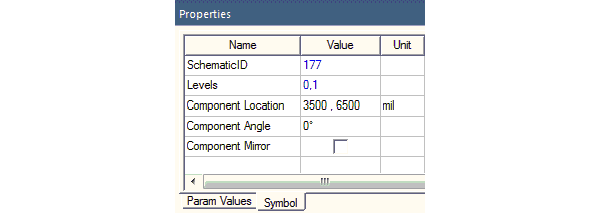
 

Symbol tab of the Properties window displaying the schematic ID


Python Syntax CreatePagePort(<PagePortProps>)
Python Example

oEditor.CreatePagePort

(["NAME:PagePortProps", "Name:=", "pageport_0", "Id:=",

12], ["NAME:Attributes", "Page:=", 1, "X:=", -0.0381, "Y:=", -0.0127, "Angle:=", _

0, "Flip:=", false])