
HFSS Transient
HFSS Transient is a solution type within HFSS. It employs a time-domain ("transient") solver. Typical applications include, but are not limited to:
- Simulations with pulsed excitations, such as ultra-wide band antennas, lightning strikes, electro-static discharge;
- field visualization employing short-duration excitations;
- time-domain reflectometry.
The interface of HFSS Transient is much like the Terminal Driven solution type in the frequency domain. The geometry creation and the mesh are almost identical. Boundary conditions and definitions of ports or incident waves are almost the same, except for some restrictions in cases where certain frequency-domain options do not apply in the time domain. Therefore, you can often change an existing Terminal Driven design into a Transient design and vice versa. This release offers a beta feature for HFSS Transient Modal Ports to allow Multi-mode Waveguide Simulations in Transient, allowing you to mix wave ports and terminals.
Before changing an existing design between Terminal Driven and Transient, you must remove the setups and solutions.)
In this release you can add a transient analysis into a driven design. This is a beta feature. To enable it, select Tools > Options > General Options to open the Options dialog box. Select Beta Options to open the Beta Options dialog box, then select Time domain analysis in driven designs. When you have enabled the feature, right-click an existing analysis and select Add > Transient Analysis from the context menu. The Time Domain Analysis Setup dialog box opens. See Transient Solution Setup in the main HFSS help for instructions on configuring your transient analysis.
The Analysis Setup for the transient solver is different from that of the frequency domain. Two types of analysis setup are offered:
- Transient Network Analysis solution types - excitations are identical on all active ports and are simulated one at a time to facilitate the data collection. Saved fields can be visualized, and voltages and currents can be monitored. Your choice in setting the Transient solution type affects the options for the setup. If you select Transient Network Analysis the setup includes a tab for the Excitation for the simulation.
- Transient Composite ExcitationComposite solution types - Different ports can have different excitations. All Active excitations are launched in one simulation. No S-parameters or TDR results may be available, but saved fields can be visualized, and voltages and currents can be monitored.
Other issues for transient solves include:
- Fields will only be saved on pre-selected surfaces, because saving all 3D fields for all times would take more disk space and I/O time than generally desired.
- If you change the size of the radiation boundary for a Transient simulation, you should expect to see changes in delay for far field results. This is because there are two origins of system for transient: one for space and one for time. For space, the original is defined the same way as frequency domain. For time, the original is located a point infinitely far away. This choice of this time origin is logical because if you place the origin at the original of a space system (in this case the center of air box) then there will be very very long time delay for every transient far field. So for the cases we have here, when air box is larger, the distance from the air box (or current source) is shorter to the time origin. Therefore we are expecting to see different time delays as radiation boundary size changes.
Materials for Transient Solution Types
Materials for transient solutions must meet these requirements.
- Materials cannot have arbitrary frequency dependence in a time-domain analysis. For lossy dielectrics, a Debye model is applied to ensure that the loss remain physical across the spectrum. For lossy metals, a Padé approximation is used for the same reason.
- When lossy materials touch a port, the port solver will launch an excitation that fits the lossless case. This is inherent to most time-domain solvers. The 3D part of the simulation will take losses into account correctly.
- Spatially dependent material properties can be specified through user-defined variables in HFSS. Spatially dependent materials are usually applied for modeling dielectric lens, dielectric waveguides, substrates with graded doping profiles, and graded-index fibers.
For example, to set the dielectric permittivity of a Luneburg
lens, you would create a variable, as shown in the following figure: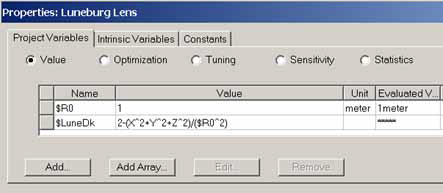
You would then assign the variable value to
the material in View/Edit Material: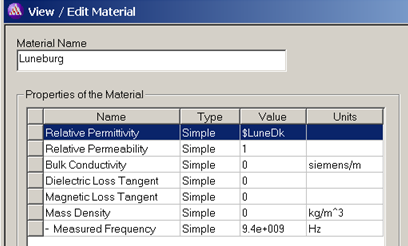
HFSS Transient current design allows ISODIEL and ISODEBYE materials to be spatially dependent. NPOLEDEBYE (poles and residues input from GUI) materials are NOT allowed to be spatially dependent because such models assume homogeneous material properties. The poles and residues are input from the GUI and there is no pole fitting involved. A fixed set of poles and residues cannot be used for inhomogeneous materials.
Solver Renormalization for Transient Wave Ports and Terminal Excitations
After you have created the Terminal Wave Port (first image) and the Modal Wave Ports (second image) with HFSS design settings -> Transient-> Solve all excitations, you can select the excitation and assign Solver Renorm (Renormalization).
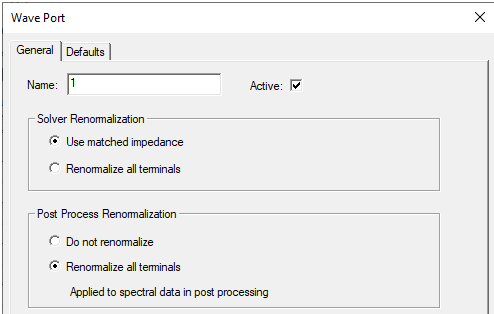
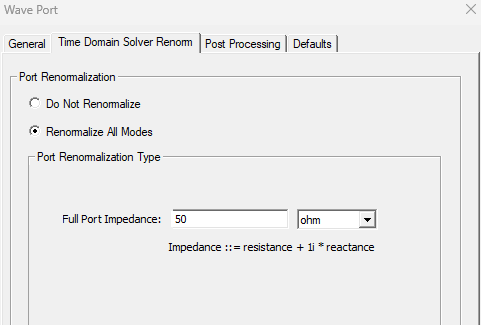
The Solver Renorm is not supported for transient composite solution type, and the Solver Renorm does not work with hybrid solver (an error message will be displayed).
For the Modal Wave Port, the Docked Properties window also contains a checkbox for selected transient excitations for Solver Renorm.
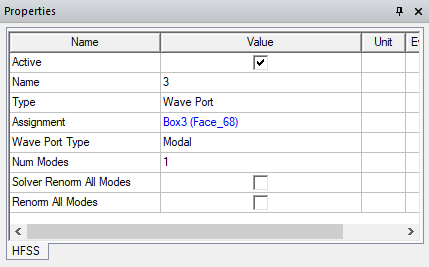
If you select a Terminal for a port for which you have enabled Solver Renorm All Terminals, the Properties lets you specify Solver Impedance for each of the terminals.
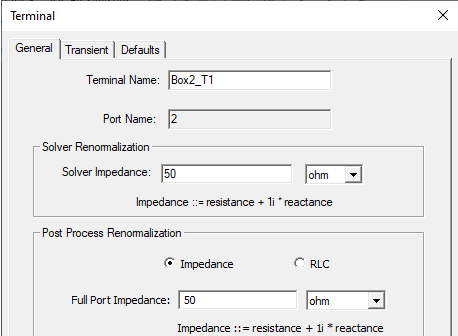
The implicit solver will then use the specified impedance to renormalize the port fields prior to solution.
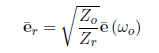
The renormalization impedance is used to transform the port fields in a similar manner as the user specified impedance for lumped ports. In the up-front transient renorm, the renormalizing impedance can be applied to multi-mode ports – where each of the user specified impedances can be different.
Since the renormalization is done on the port fields prior to the transient solution, changes to the renormalizing impedance will invalidate the solution and require a new solution from the start.
The nominal port impedance and fields that are taken from a mid-frequency of the specified transient excitation.
Dispersive ports will not be solved with a PML backing, resulting in a slightly reduced problem size.
Diagonal Anisotropic Material Support for the Implicit Transient Solver
HFSS Transient supports diagonal anisotropic material for the Implicit Solver. If you launch a hybrid solve the Message window displays an error message.
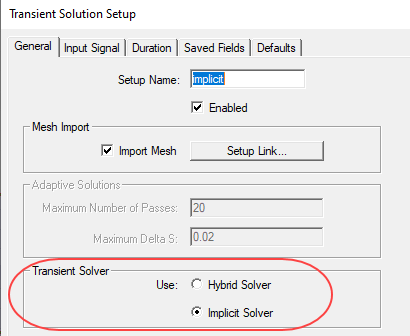
Support is only for diagonal anisotropic materials (not full tensor) and no space dependence or frequency dependence are allowed. Diagonal anisotropic combined with frequency dependent or spatial dependent fails validation for transient. You specify such material using the Materials intereface.
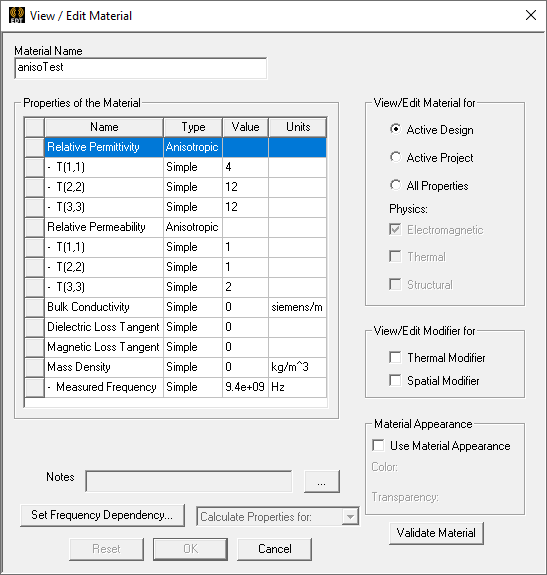
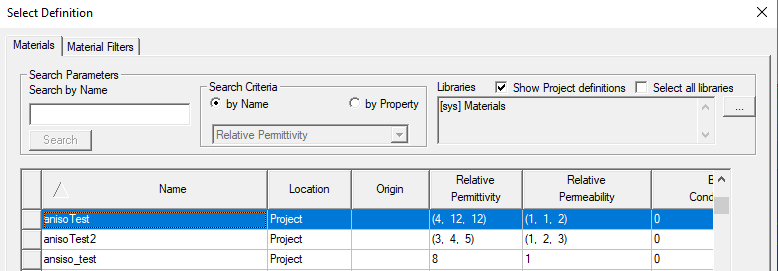
Once created, you can select them in the Materials dialog in the library where you create them.
Diagonal anisotropic materials are not allowed to touch port and radiation boundaries. The Message window displays an error if anisotropic materials touch port and radiation boundaries.