Assigning a Reduce Matrix for 2D and 3D AC Magnetic Designs
For 2D and 3D AC Magnetic designs, you can join (group) two or more excitations to one excitation in either a series or a parallel connection. The result of each join (group) operation is known as a Reduce Matrix. This would be useful when analyzing designs such as a motor with four poles, each pole having three wires coming into it, with the physical design having each set of three wires in series, and the four bundles of wires in parallel.
To create a reduce matrix:
-
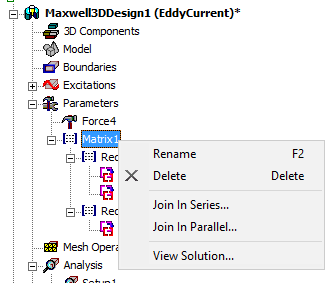
Right-click on an existing Matrix parameter in the Project Manager tree.
-
Select either Join in Series or Join in Parallel.
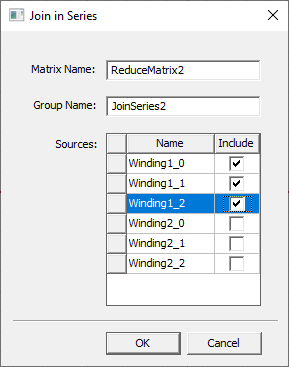
A corresponding Join in Series or Join in Parallel dialog box opens. You can accept the default reduce Matrix Name, or enter the desired name.
-
You can enter a Group Name (or accept the default), and check Include for those sources you wish to join in series (or parallel).
Note: Multiple group operations are supported. For example, you could join conductors 1, 2, and 3 in one series; and conductors 4, 5, and 6 in another series. -
Click OK to close the dialog and add the new reduce matrix group under its parent Matrix.
If you want to make changes, you can double-click on the reduce matrix group item in the tree to reopen the dialog box. You can also right-click the item to rename or delete it.
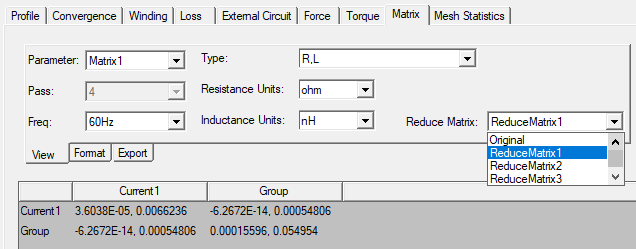
You can view the results of reduce matrix calculations on the Matrix tab of the Solutions dialog box.
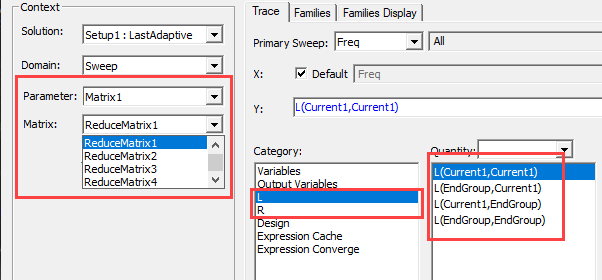
You can select reduce matrices to plot inductance and resistance quantities for various report types.