
Modifying the View Orientation
There are several places you can access commands to change the view orientation in a Modeler or 3D Plot window:
- Select the Orient drop-down Menu on the View ribbon tab and choose one of the predefined view orientations:
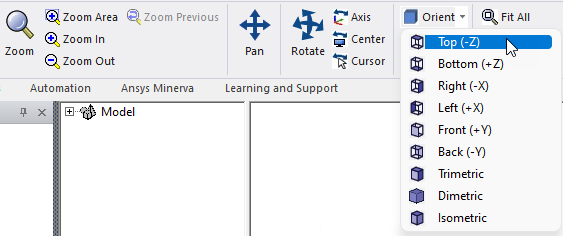
The sign and letter in parentheses that follows each standard view indicates the viewing direction, not the model side. For example, consider a simple box aligned with the global planes. The right side of the box is the +X side, but the viewing direction is -X (you look leftward to see the right side of an object).