CreatePolygon (Schematic Editor)

Creates a polygon.

UI Access Draw > Primitive > Polygon.
Parameters
Name Type Description
<PolygonData> Array

["NAME:PolygonData"

"Points:=", Array of points,

"LineWidth:=", double, // the width of the Polygon border, in meters

"Bordercolor:=", int, // the RBG value of the border color

"Fill:=", int, // the fill pattern id, 0 = hollow, 1 = solid, 2 = NEDiagonal,
3 = OrthoCross, 4 = DiagCross, 5 = NWDiagonal, 6 = Horizontal, 7 = Vertical

"Color:=", int, // the RBG value of the Polygon fill color

"Id:=", int], // [Opt=New id] Id for this item

<Attributes> Array

["NAME:Attributes",

"Page:=", int] // [Opt=1] Page number (one-based)

[out,retval] string id]

Return Value String with the format SchObj@<schematicID>

The Schematic ID can be found in the Properties window on the Symbol tab when you select the polygon.
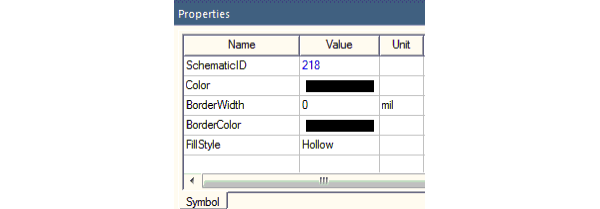
Symbol tab of the Properties window displaying the schematic ID

Python Syntax CreatePolygon()
Python Example

oEditor.CreatePolygon(

["NAME:PolygonData",

"Points:=", ["(-0.058951, 0.006308)", "(-0.046142, 0.010480)",

"(-0.046239, 0.001067)")],

"LineWidth:=",0,

"BorderColor:=", 0,

"Fill:=", 0,

"Color:=",0,

"Id:=", 27

],

["NAME:Attributes", "Page:=", 1]

])