
Save Fields Tab
For transient thermal solutions, field results are saved only for the final time step, unless you choose otherwise. Use the settings in this tab to save fields results for every time step, for every nth timestep, or for a varying interval (as defined by a dataset).
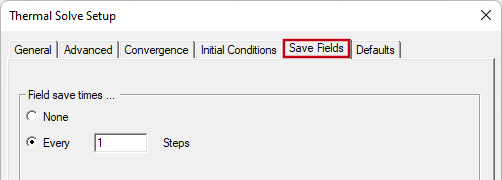
- None: Only the field results from the final time step will be saved (no intermediate fields). This is the default setting.
- Every ____ Steps: Specify the save frequency. A value of 1 will save field results for every timestep. Specifying 2 would save every other timestep, 3 every third, and so on.
Additionally, you can reference a dataset using a pwl (piecewise linear), pwl_periodic (piecewise linear periodic), or pwc (piecewise constant) function to vary the fields-saving interval. Use this technique to save field results at finer time increments within periods of interest and coarser increments elsewhere. For more information, see Using Datasets to Define Transient Parameters and Using a Piecewise Constant (pwc) Function.
Field results cannot be saved for substeps but only for the time steps specified in the Transient Setup section of the General tab.
Save fields results if you want to animate the fields (such as temperature and heat flux overlays).
If you are mainly interested in how temperatures at specific points vary over time, and you are satisfied with a 2D graph of these results, assign Thermal Monitor points. Saving temperature results at user-specified points is more efficient than saving fields results globally, reducing drive storage requirements and input/output time.