
Editor Scripting IDs
Objects in the schematic are identified by text IDs. These IDs are used in scripts to perform actions on objects. These IDs are returned by all methods that add objects, and by the FindElements and GetSelections methods. The IDs are then passed into commands to modify or remove Schematic objects.
Format of IDs for different schematic objects:
Components: CompInst@<CompName>;<compInstID>;<optional schematicID>
Geometric primitive: SchObj@<schematicID>
Global Port/ground :: GPort@<portName>;<schematicID>
Interface Port :: IPort@<portName>;<schematicID>
Page Port: PagePort@<portName>;<schematicID>
Wire : Wire@<netName>;<schematicID>;<segment index list>
Find this information in the Properties Window for the selected object as follows:
<CompName> General tab/CompName
<compInstID> General tab/ID
<schematicID> Symbol tab/SchematicID
<portName> Param Values tab/PortName
<netName> General tab/NetName
<segment index list> numbers separated by commas; Symbol tab/Segmentn - e.g. Segment0 refers to index "0"
In the Layout, the ID for a selected object is always the Name or Net property in the Footprint tab of the Properties Window
Format for Components
["CompInst@CAP_;2;4"]
The format for Components is CompInst@<CompName>;<compInstID>;<optional schematicID>. In the documented example, <CompName> stands for the component name CAP_, <compInstID> stands for its ID 2, and <optional schematicID> is the schematic ID 4. If you select the component, the Properties window gets updated and displays its details. For example, the selected object’s component name and ID appear in the General tab of the Properties window as shown below.
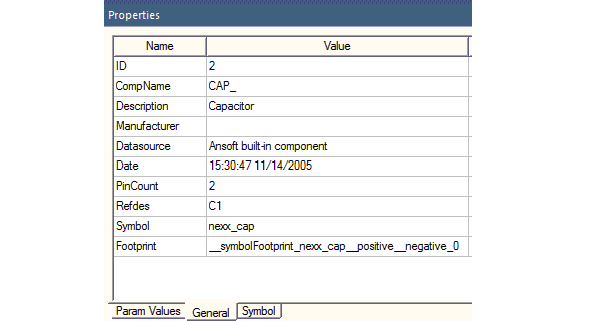
The SchematicID is shown in the Symbol tab.