CreateIPort (Schematic Editor)

Create an interface port

UI Access Draw>Interface Port
Parameters
Name Type Description
<IPortProps> Array

Array("NAME:IPortProps"),

"Name:=", string), // [Opt=default name] Name for this port

"Id:=", int), // Port id number

<Attributes> Array

Array("NAME:Attributes", _

"Page:=", int, _ // [Opt=1] Page number (one-based)

Note:

Page 1 always exists
"X:=", double, _ // X position of the object
"Y:=", double, _ // Y position of the object
"Angle:=", double, _ // Rotation angle (radians)
"Flip:=", bool), // True if mirrored
[out,retval] string id)

Return Value String

Unique id

Interface port is created and the returned value has the following format:
IPort@<portName>;<schematicID>
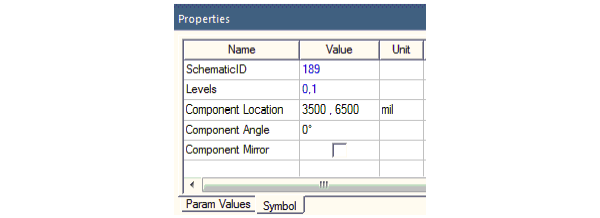
The interface port schematic ID can be found in the Properties window on the Symbols tab.


Python Syntax CreateIPort()
Python Example

oEditor.CreateIPort (["NAME:IPortProps", "Name:=", _

"Port1", "Id:=", 4], ["NAME:Attributes","Page:=", _

1, "X:=", -0.0381, "Y:=", 0.0127, "Angle:=",_

0, "Flip:=", false])