
Port Post Processing Tab: Modal Solutions
De-embedding and renormalization are the two post processing options available in HFSS. De-embedding changes the reference plane where the port is placed rather than literally defining a new port on a different reference plane. Reference plane is the location where the S-parameters are calculated. De-embedding helps to calculate the S-parameters near or on the plane of a discontinuity or when a long transmission line is attached to the port plane instead of explicitly modeling it in HFSS.
Renormalization changes the load impedance of the port.
Both renormalization and deembedding affect the network
parameters. They will also affect the fields if the Include
Port Post Processing Effects option is selected in the Edit Sources dialog box.
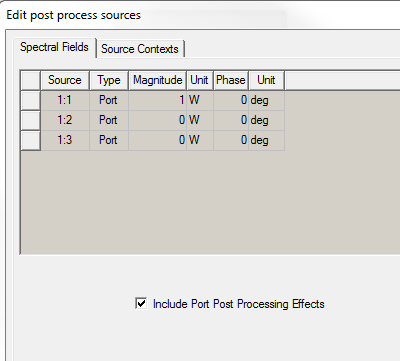
We will now explain the concept of De-embedding and Renormalization.
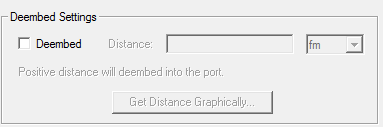
Deembed Settings
First we will not employ deembedding as shown under Deembed Settings of the wave port post processing
dialog box.
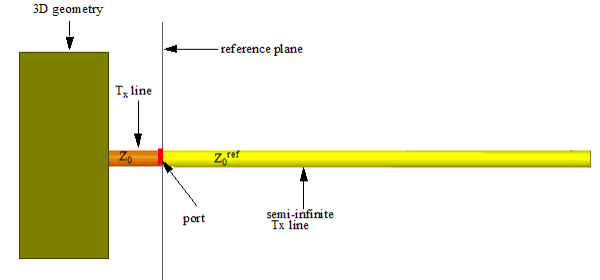
In this situation, by default the reference plane will
be along the port surface as shown below.
We will now employ deembedding.
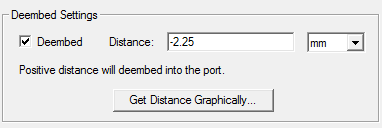
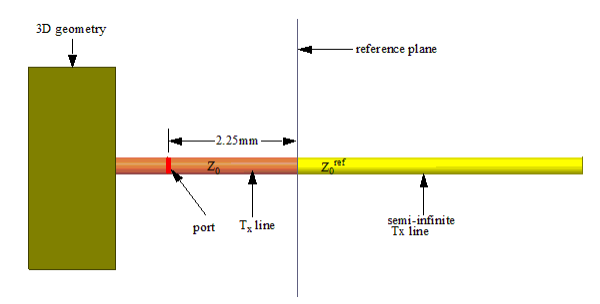
HFSS shifts the reference plane when you deembed.
Renormalization
This option lets you vary the value of Z0ref. When you do not renormalize Z0ref is Z0 . When you renormalize as shown in the following figure, Z0ref will no longer be Z0 but it will be assigned the value that you enter in the Full Port Impedance field. The settings in the following figure makes Z0ref = 75 ohm.
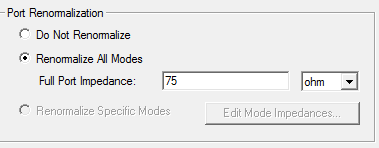
If you want to enter a complex impedance, enter it in the form <re> + <im>j., for example 50ohm + (-5ohm) * 1i . You can assign a variable to these values, (for example " resistance + (reactance) * 1i"). This variable can be dependent on the frequency, which allows use of a dataset for frequency dependent impedance, (for example, pwl(ds1,freq) + (pwl(ds2,freq)) * 1i).
You do not need to re-run a simulation in order to renormalize a port. Post-processing reports are automatically updated to reflect the renormalized S-matrix.