
Options for Fast Sweeps
For Fast sweeps, the Edit Sweep dialog options you can set include:
- Sweep Name
- Frequency Setup
- For Fast Sweeps, you can select Save Fields, Save radiated Fields only, and
whether to Generate fields at solve time (All frequencies).
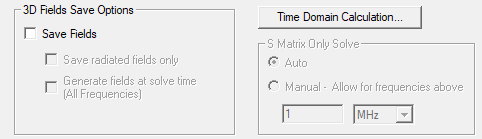
By default, all fields are saved. (This field is disabled under a Solve Ports Only setup. You can view port fields for the discrete frequencies under the port field display in the project tree.)
Selecting Save Fields enables the check box for Generate Fields for all frequencies while solving. By default, fields are not generated. If you have more than 100 frequencies, checking the box generates a warning that disk space use may be excessive.
If you select this option, HFSS solves the fast sweep and then computes the fields at each freq in the sweep, and saves them. This has two effects: (a) the simulation takes longer due to saving the fields, (b) Post processing is much faster.
Since this option is exercised at solve time, it doesn't apply to existing solutions. Enabling this option for a previously solved sweep and re-solving will access the previously solved data and generate the requested fields.
- DC Extrapolation options (appearing depending on the Design Settings for DC Extrapolation)
If you expect to use the same settings often, you can click Set Defaults. To use previously saved settings, click Use Defaults.