
Duplicating Integration Lines
You can duplicate an integration line along a vector multiple times and assign to additional modes at the port. This section shows how to duplicate the integration line in the following figure.
- In the Wave Port dialog box, click the Modes
tab and draw the integration line 1 on the port.

- Enter the number of modes and select Duplicate Previous Line from the Integration
Line column.
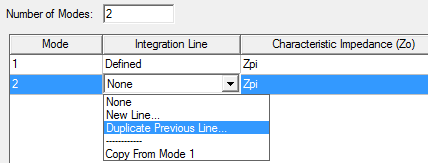
- Click an arbitrary anchor point on the
edge of the port face for position 1 and drag the cursor along the edge
to position 2 as shown in the figures below.
The Integration Line 2 shifts from Integration Line 1 by a distance equal to that between Position 1 and Position 2.
Note:Use the Measure Data dialog to set this distance.
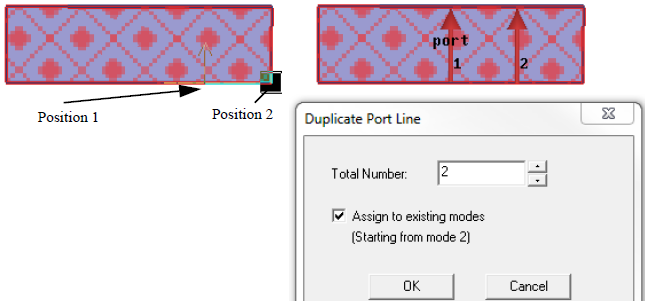
- Enter the total number of lines, including
the original and duplicates, to make in the Duplicate
Port Line.
If you type a value that is greater than the number of assigned modes, the extra duplicates will appear as gray integration lines until they are assigned to a mode.
- Optionally, select Assign to existing modes. The duplicates will be assigned to the modes defined for the port, beginning with the mode after the one with the line that was duplicated.