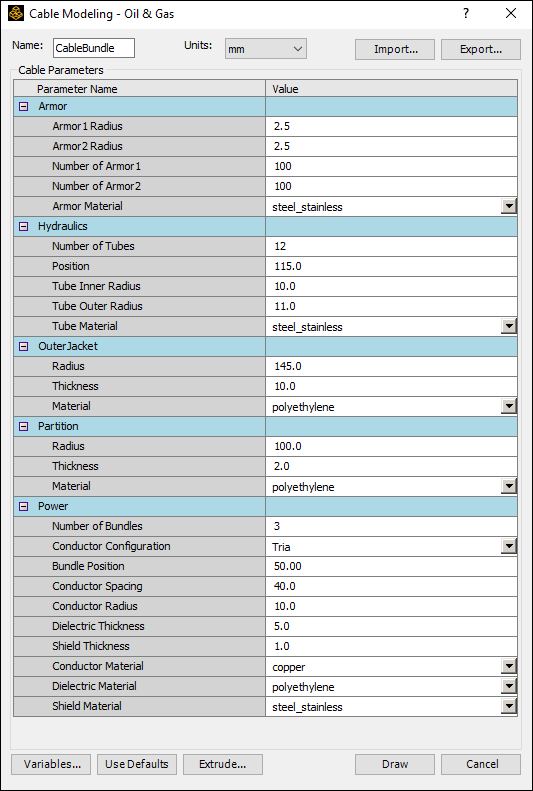
Cable Modeling - Oil and Gas Toolkit
To work with tool kits in the oil and gas industries:
- Click
- Enter a Name for the toolkit, and select Units.
- If you have a *.csv or *.tab file containing cable parameters, you can Import it.
- To manually modify the cable parameters:
- Enter and select values for each of the available fields, in the unit you selected.
- To save your cable parameters for future use, click Export to create a *.csv or *.tab file for later import.
- To add new variables, click Variables. This opens the Edit Variables dialog box. All variables that are already present in the project and design levels are listed. Click Add to add a new row to create new variables.
- Click Draw to draw the 2D cross-section geometry. A validation check is run. This catches errors such as any variable or parameter missing a value.
- For 3D designs, you can create a 3D geometry.
Click Extrude. The Extrude to 3D dialog box appears.
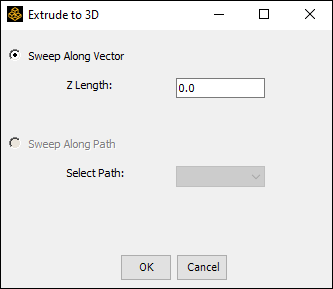
- Click Sweep Along Vector to extrude along the z axis. Z length is the input parameter.
- Click Sweep Along Path to extrude along
a selected path.
Note:
3D models of cables are hard to solve if the ratio of extruded length to cross-section diameter is high.
The Cable Modeling - Oil & Gas dialog box appears.