
Assigning a Dielectric Cavity
To assign a region as a Dielectric Cavity, the object must have a dielectric material assignment. The Lambda refinement setting in the Solution Setup is ignored in a dielectric cavity. Two dielectric cavities can be in contact.
- Select the object you want to assign as an Dielectric Cavity, and use one of the following menus:
HFSS>Assign Hybrid>Assign>Dielectric Cavity
Right-click in the Modeler window and select Assign Hybrid>Dielectric Cavity.
Select the Hybrid Regions icon in the Project
tree, right-click, and click Assign>Dielectric
Cavity.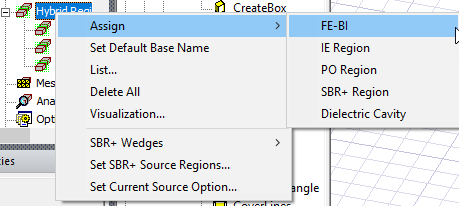
The Hybrid Region
dialog opens.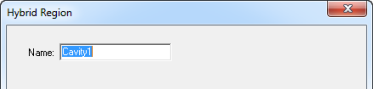
- When you OK the dialog box, the assignment appears in under Hybrid Regions icon in the Project tree.