
Assigning Half Space Boundaries in HFSS
The Half Space boundary is designed for solving antenna and scattering problems with a background comprising a dielectric half space. The Half Space boundary splits the background material along a z=constant plane. The antenna or scatterer can be located in the top medium (for example, air) or the bottom medium (for example, sea water) or embedded in both. Half space boundary is only available to an HFSS Hybrid and Arrays design but can include both FEM areas and IE regions. An HFSS Hybrid and Arrays design can only have one half space boundary. You do not select an object to assign a Half Space boundary. For such projects, compared to solving with a single domain, using a Half Space boundary the results will be similar though not identical but will use less time and fewer resources.
Right-click Boundaries>Assign>Half Space to display the Half Space Boundary dialog.
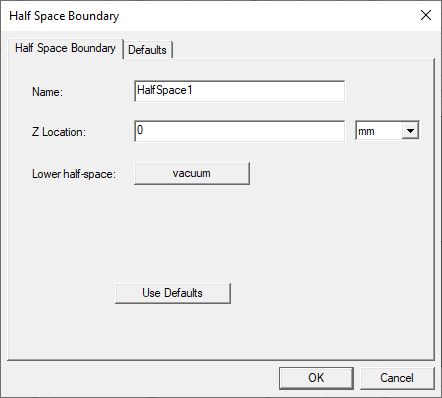
- Specify a Name in the text field.
- Specify a Z Location, Z and select units from the menu.
- Specify the lower-half space material. The "lower half-space" material defines the material in the lower half-space, and the upper half-space is defined using the global background material.
The Boundary appears in the Project tree. If you select the boundary in the Project tree, a rectangle representing the boundary shows in the Modeler window, and the docked properties shows the properties.