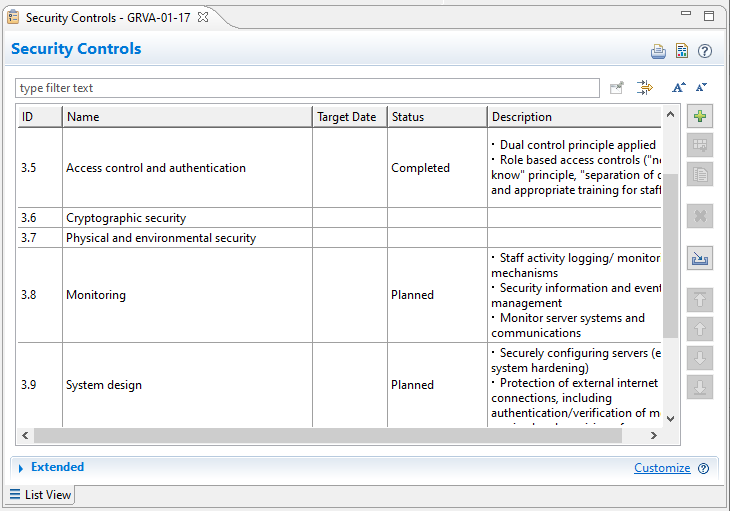
Security controls and measures are, as all kinds of measures or mechanisms in the tool, maintained in special measure collections. Measures may refer to technical approaches, but also to processes.
Select an arbitrary package in the project and use "New | Collection | Measure/Mechanism Collection". Choose "Security Mechanism" in the upcoming dialog and give the collection an expressive name to summarize the reasoning behind this collection. Note that there may be numerous measure collections in the project
Security measures have a short name and an optional longer description. Target date and Status can be used to express and maintain a simple workflow. The id is generated automatically but may also refer to a well known measure or process id known in a company.
A complete list of measures can be imported from Excel/CSV files. Either use the "Import" button in the table editor or use "Import | From CSV/Excel" from the model browser context menu of the collection.
Measures can be moved from one collection to another, but only if both collections are of the same "kind", i.e. of type "Security Mechanisms".
An example:
There is a set of well defined security policies in a company, reflecting requirements from the authorities, but also best practices and process requirements. That list is available as Excel dump
A new collection named "Mandatory Security Measures" is created and all measures from Excel are imported into that collection.
Among them there is a measure named "Access control and authentication" to enforce "Dual control principles" and a "Role based access controls". Another one addresses "Human resource security and security awareness" and ensures that "Appropriate training for staff especially those handling data assets" is in place.
Both measures are used to mitigate a risk that was identified by a "Compromise data held on back-end servers/data breach" threat in a SOA (Software over the Air) system, originated in an "Information breach by unintended sharing of data" vulnerability.