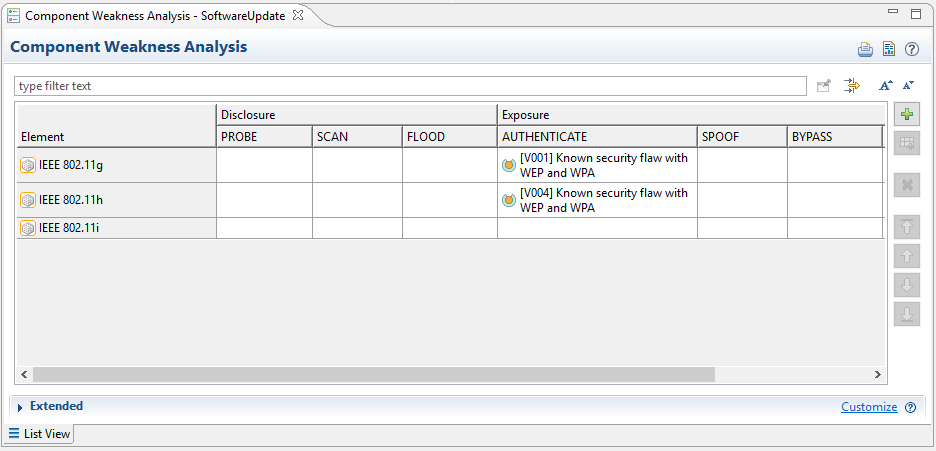
The knowledge of vulnerabilities in the system is essential to analyse potential attack and threats, to estimate their risk and above all, to come up with suitable mitigation strategies. Often an attack is applied on a weak part of the system (known as "Attack Surface"), not necessarily being an asset itself so it is important to identify (or know) weaknesses of all parts of the system. To do so, a Guideword based vulnerability analysis can be used.
Select an arbitrary package in your project and create a new "Guideword Analysis". Select the right template for this analysis and enter a suitable name for this model. Note that this step-by-step instruction assumes that a Guideword template for Cybersecurity has been prepared beforehand. If you haven't done that, you can add Guideword columns on demand in the editor.
Drag the "Target of Evaluation" model to the open Guideword editor or just individual parts of it. The editor will automatically add rows for all not yet analysed parts of the system. Depending on the used template, columns are there for each guideword, spanning a matrix.
Select an arbitrary cell representing a potential weakness for a given element (row) found by a given guideword (column) and enter a descriptive text for the weakness/vulnerability. The editor will crate a new Vulnerability object for the element.
Fill in other cells if you identify more vulnerabilities. You can drag vulnerabilities to empty cells in other rows to use them as blueprint if similar vulnerabilities exist in other elements. You can drag them to empty cells in the same row to express that the same vulnerability "matches" other guidewords as well.
An Example:
An OEM is offering server based services. To utilize them, all vehicles of the OEM have a telematics unit on-board. The unit supports all kinds of wireless protocols, including WiFi connections for high speed data transfers.
The OEM is using a custom list of guidewords to identify weaknesses and vulnerabilities. The list of guidewords contains for example PROBE, SCAN or FLOOD to reflect typical attack scenarios to disclose sensitive information about a server or host. Other guidewords as SPOOF, BYPASS or MODIFY are there to reflect attack scenarios to expose or compromise sensitive data.
A guideword analysis on the telematics component is executed, revealing that the WiFi component that is used has a weakness in the WEP/WPA authentication algorithms. In addition a similar analysis is executed on the component library that includes all revisions of all used WiFi components.