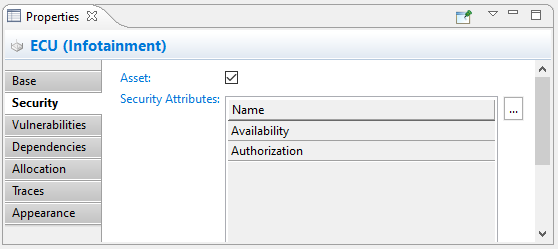
Each Asset can be associated with a set of security attributes. The loss of any of the associated security properties may lead to damages to one or more of its stakeholders. The associated attributes can be used later during threat identification to find typical threats. There are a number of core principles like the CIA triad (Confidentiality, Integrity, Availability), and a number of extensions like CIAA and consolidated best practices like HEAVENS that define a generic, stable set of security attributes. The later is used as a default but can be customized in the project settings.
Select an arbitrary element of your design, either in the model browser or on any diagram. You can select structure elements but also behavior elements.
Make sure it is marked as an asset. Security Attributes can only be associated to assets. Otherwise the corresponding controls are disabled.
Double click on the "Security Attribute" table or use the [...] button. Check appropriate security attributes that are valid for a the selected element. This step can be repeated as often as required. Security attributes can also be removed from an Asset if they are not applicable any longer.
An example:
The system design of a car infotainment system includes an Infotainment ECU
The ECU stores information from the car owner, as playlist, login data and server credentials to access cloud services from the car OEM
The ECU is marked as an asset, having "Availability" and "Authorization" security attributes added as an initial set of attributes