


| CLI for Compare / Merge | With 2019 R2 a Command Line Interface (CLI) has been implemented to support compare and merge of MPRX files via command line to be used in batch scripts or to integrate medini into other tools. Using that interface, medini can be launched either with two MPRX files to compare, or three MPRX files to merge. The tool will start directly in the compare perspective, showing the differences between the two versions. Merge results are automatically stored back to the merge target. A separate workspace is used to avoid conflicts with user workspaces. This feature fosters the integration of medini as compare and merge tool using arbitrary Revision Control Systems (RCS) as for example Subversion or Git, hat support a CLI based integration.
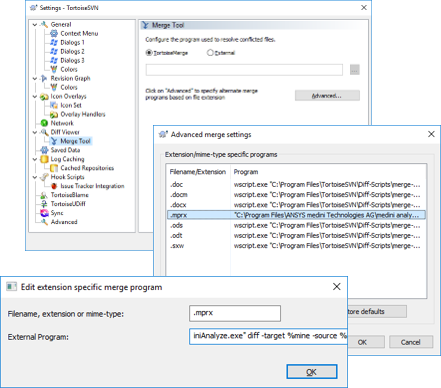
Hint: to see all options and parameters of the new (and future) command line interface, simply use "mediniAnalyze.exe -help". |
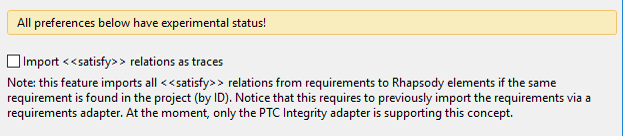
| Import Relations from Rhapsody | 2019 R2 introduces a new feature to import satisfy relations from system elements to requirements done in Rhapsody, based on imported requirements from another requirements management tool to Rhapsody before. In case of an import from Rhapsody to medini, all "satisfies" links between Rhapsody model elements are imported as "allocation traces" in medini if the target of the link is a requirement that was already imported before from a requirements management system (RM or ALM/PLM) into medini. This feature fosters the seamless integration of modeling tool, requirements management tool and safety tool. It is an optional (and in 2019 R2 still experimental) feature that has to be enabled in the "Rhapsody" preferences. The feature is currently limited to "Rhapsody" in combination with "PTC Integrity".
|
| Cross model contributions | Safety requirements living in different models usually contain contributions links that cross model boundaries, e.g. if functional and technical safety requirements are managed separately. Cross module contributions are now synchronized on export and import, to and from DNG, Jama or PTC Integrity. |
| MATLAB 2018b support | The MATLAB Simulink integration was upgraded to support also MATLAB version 2018b. |
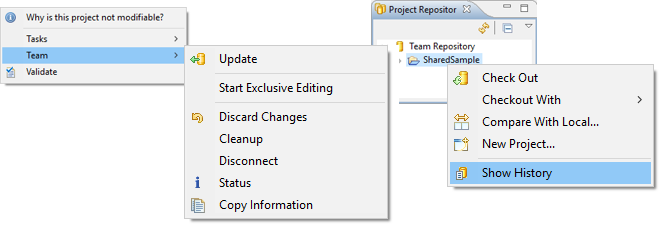
| Integrated SVN Team Support | The integrated team support for Subversion has been slightly improved. There is a new action in the model browser team menu to quickly copy all relevant SVN information as path URL, revision and author to the clipboard. The project repository team menu has been extended by a new action to show the history of the selected element.
|