


The Ansys HPC Manager web app runs on the machine where Ansys HPC Platform Core Services are installed.
You can launch the Ansys HPC Manager web app in the following ways:
In a browser window, enter https://
hostname:8443/hps/jms (or https://hostname:8443/rep/jms), wherehostnameis the hostname of the machine where Ansys HPC Platform Core Services are running.If Ansys HPC Platform Services have been deployed on your company's premises, you can obtain the hostname from your administrator.
If Ansys HPC Platform Services have been deployed in Ansys Gateway powered by AWS, you can obtain the HPS URL in the autoscaling cluster details. For more information, see Viewing Autoscaling Cluster Details in the Ansys Gateway powered by AWS User's Guide.
If Ansys HPC Platform Services have been deployed in Ansys Access on Microsoft Azure, you can obtain the HPS URL in the autoscaling cluster details. For more information, see Viewing Autoscaling Cluster Details in the Ansys Access on Microsoft Azure User's Guide.
Note: When using Ansys Gateway powered by AWS or Ansys Access on Microsoft Azure, you must launch Ansys HPC Manager one time using the Connect action before using the HPS URL to configure job submission to Ansys HPC Platform Services. This allows the client machine to be allowlisted.
In Ansys Workbench, when a Workbench project has an established connection with Ansys HPC Platform Services, an button is available on the status bar. For more information, see Accessing the Ansys HPC Job Manager Web App from a Workbench Project in the Workbench User's Guide.
In Ansys Gateway powered by AWS, select the autoscaling cluster that has Ansys HPC Platform Services installed. In the autoscaling cluster details, go to the node where Ansys HPC Platform Services is installed and click to connect to the Ansys HPC Manager. For details see Launching the Ansys HPC Manager Web App in the Ansys Gateway powered by AWS Recommended Usage Guide.
In Ansys Access on Microsoft Azure, select the autoscaling cluster that has Ansys HPC Platform Services installed. In the autoscaling cluster details, go to the node where Ansys HPC Platform Services is installed and click to connect to the Ansys HPC Manager. For details see Launching the Ansys HPC Manager Web App in the Ansys Access on Microsoft Azure Recommended Usage Guide.
Signing In to the Ansys HPC Platform Services Web App
When you access the app, you are prompted to sign in. The credentials needed to sign in depend on how authentication has been set up by your organization. For more information, contact your IT administrator.
The default credentials are:
| Username | Password | |
|---|---|---|
| Administrators | repadmin | repadmin |
| Simulation users | repuser | repuser |
Signing Out of the Ansys HPC Platform Services Web App
To sign out of the app, click the user menu in the upper right corner and select .
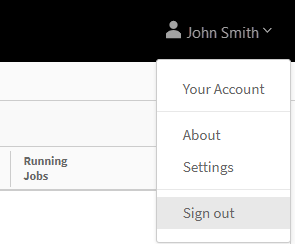
If you are signed in to the app but want to switch to a different user account, you must sign out and then sign back in using the credentials for the other account.