


To see the available commands and options, run hps-launcher-service --help. For example:
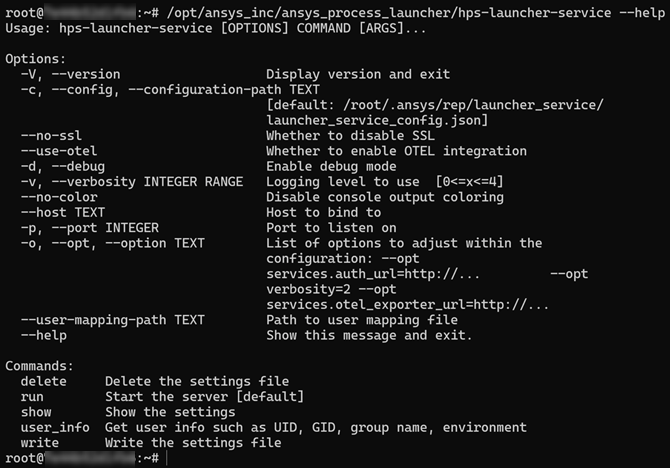
Consistent with the other services, the Process Launcher service includes run, show, and write commands.
To see the help for a specific command, run the command with the --help argument. For example, to see help for the write command:
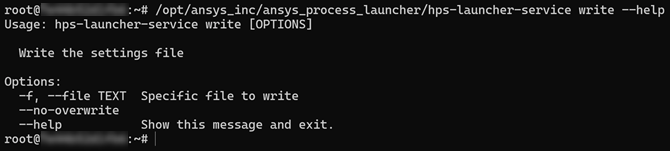
To write a configuration:
As the user running the service (root user unless changed in the systemd file), run the command hps-launcher-service write.
Use the show command to view the configuration. The “data_directory” property tells you where the scaling service configuration is located. The configuration is specified in the launcher_service.json file.
Edit the launcher_service.json file. Configurable properties are highlighted in bold in the following sample and described below.
{
    "host": "0.0.0.0",
    "port": 4911,
    "debug": false,
    "debug_middleware": false,
    "disable_ssl": false,
    "use_otel": false,
    "root_path": "",
    "origins": [
        "*"
    ],
    "verbosity": 1,
    "data_directory": "/root/.ansys/rep/launcher_service",
    "services": {
        "auth_url": "http://localhost:8080/rep/auth/realms/rep",
        "external_auth_hostname": null,
        "external_auth_port": null,
        "external_auth_protocol": null,
        "otel_exporter_url": "http://localhost:4317/",
        "monitor_url": "grpcs://localhost:8443",
        "admin_keys": [
            "groups.admin",
            "roles.admin"
        ],
        "otel_exporter_type": null
    },
    "allowed_hosts": [],
    "allowed_users": [],
    "disallowed_users": [
        "root"
    ],
    "user_mapping": {},
    "timeout_sec": 30,
    "use_sudo": false,
    "sudo_command": "sudo -u {user} -n -i",
    "getuid_method": "getpwnam",
    "min_uid": 1000,
    "min_gid": 1000,
    "grpc_headers": [
        "application-path=rep/monitor_sink"
    ],
    "logs": [
        "file",
        "console"
    ],
    "monitors": [
        "otel"
    ]
}
| Property | Description | Default value | Option to configure property (in hps-launcher-service command options) |
|---|---|---|---|
| "host" |
The network interface on which the Process Launcher runs | 0.0.0.0 | --host TEXT |
| "port" |
The port on which the Process Launcher runs | 4911 | -p, --port INTEGER |
| "debug" |
Debug toggle for extra debugging information | false | -d, --debug |
| "disable_ssl" |
Disables ssl checking | false | --no-ssl |
| "data_directory" |
Default directory for configuration files and logs | <serviceuser>/.ansys/rep/launcher_service/ | |
| "auth_url" |
Path to Keycloak Realm | https://localhost:8443/rep/auth/realms/rep | |
| "allowed_users" |
List of usernames that are allowed to contact the service. If this list is empty, it is assumed all users are allowed. | ||
| "disallowed_users" |
List of usernames that are not allowed to contact the service | root | |
| "user_mapping" |
This property has two roles:
To define mappings, specify a comma-separated list using the following format: "userA": "userX", "userB": "userY". |
Instead of explicitly specifying a list in the configuration file, you can use the --user-mapping-path TEXT option to specify a path to a user mapping file. The user mapping file should contain a single JSON object containing string key-value pairs defining the user mappings, for example: {
"user_a": "user_b",
"user_c": "user_d"
}
The user mappings contained in this file will configure the “user_mapping” property in the settings, overwriting any existing mappings. | |
| "use_sudo" |
Launch processes using sudo. If true, Process Launcher launches processes using the command specified in “sudo_command”. | false | |
| "sudo_command" |
The command used to launch processes using sudo. This is a Python “f-string” that must contain the variable “{user}”, which will be replaced by the username of the user submitting the request. | sudo -u {user} -n -i | |
| "getuid_method" |
Method to get the UID (user identifier). A UID is a number assigned to each Linux user. The default method is "getpwnam", which gets user information using inbuilt functions. If an alternate method is needed, the "id_command" method can be used to get the same information using the id command line utility in Linux. | "getpwnam" | |
| "min_uid" |
Minimum user account ID allowed to contact the system | 1000 | |
| "min_gid" |
Minimum group ID allowed to contact the system | 1000 |