


The Motion system performs Multibody Dynamic (MBD) Analysis, a means of analyzing the dynamic behavior of a system of interconnected bodies.
This system is configured in Ansys Mechanical, using the Ansys Motion solver to compute the solution.
To work through a Motion system:
To add a Motion analysis system, drag the system from the Toolbox to the Project Schematic or double-click the system in the Toolbox.
To load the geometry, right-click the Geometry cell and select or from the context menu.
To view the geometry, right-click the Model cell and select from the context menu or double-click the Model cell.
Alternatively, you can complete this step using the Setup cell.
In the Mechanical application window, complete your analysis using the application's tools and features.
For information on standard Mechanical features, see Using Standard Mechanical Features. For Motion specific features, see Define Motion Specific Features.
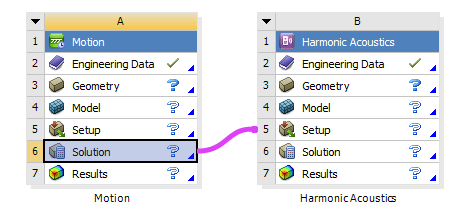
To connect the Ansys Motion system to a Harmonic Acoustics system:
Drag the Harmonic Acoustics system from the Toolbox to the Project Schematic.
Drag the Solution cell of the Motion system onto the Setup cell of the Harmonic Acoustics system.
Maxwell to Motion Coupling
NVH workflows require iteration of solutions in the Maxwell and Motion applications. It is inconvenient to manually select the *.unv file repeatedly for each solution, so Workbench supports a schematic link between the two applications, automatically creating a MotorEMForce object that uses a specific *.unv file. This feature allows you to run repeated solutions without having to re-select the file.
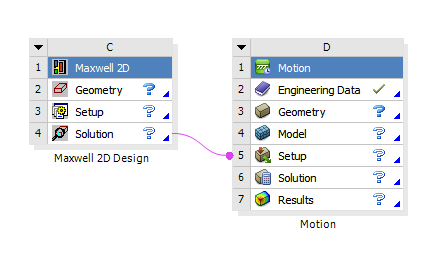
A single MotorEMForce object is created for each link and the coupling supports 2D designs. If the schematic link is deleted in Workbench, the MotorEMForce object is automatically removed from the model.
For more information, see Motor EM Force.