


From the M by N Contact property dialog, the parameters for contact type, contact characteristics, and the contact entities can be modified as shown in the figure and table below.
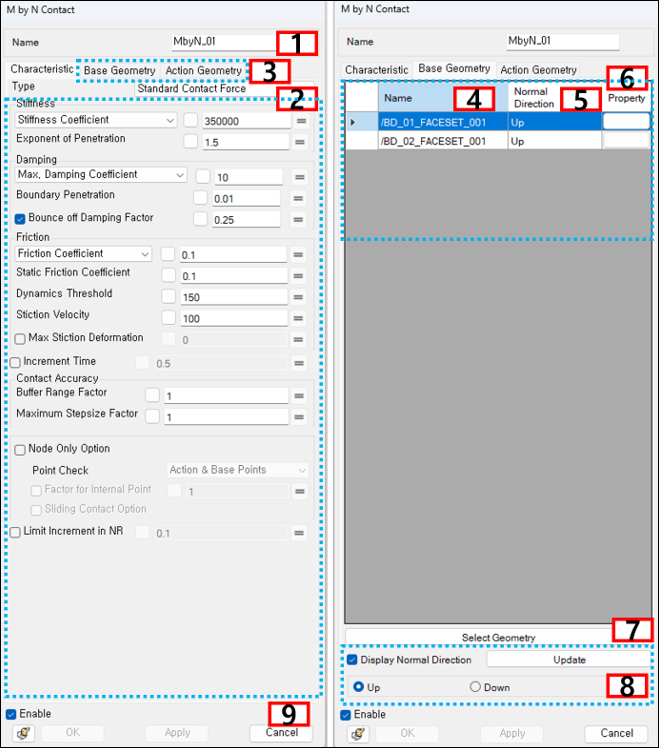
Figure 4.29: Description of parameters in the M by N Contact property dialog
| Parameter | Symbol | Description | Dimension (Range) |
| 1. Name | N/A | Use to set the name of the M by N Contact object. | N/A |
| 2. Contact Characteristics | N/A | Use to select method for calculation of contact force. For more information, refer to General Contact Properties. | N/A |
| 3. Base & Action Geometries | N/A | Use to set the parameters for the contact geometry. | N/A |
| 4. Name | N/A | Use to show the name of the faceset, patchset or edgeset. | N/A |
| 5. Normal Direction | N/A | Use to show the normal direction of the faceset, patchset or edgeset. | N/A |
| 6. Property | N/A | Use to set the corresponding Faceset Properties, Patchset Properties or Edgeset Properties. If the button is clicked, the property dialog for the faceset, patchset or edgeset is opened. | N/A |
| 7. Select Geometry | N/A | Use to add or remove the base or action geometries. | N/A |
| 8. Display Normal Direction | N/A | Use to set the normal directions of the selected base or action geometries. When the button is clicked, the specified normal direction is applied. | N/A |
| 9. Control buttons | N/A | If all necessary parameters are set, these buttons are enabled. For more information about the control buttons, refer to Entity Properties Access and Modification. | N/A |