


When the Fatigue Diagram is evaluated or selected in the tree item, it is displayed as shown below:
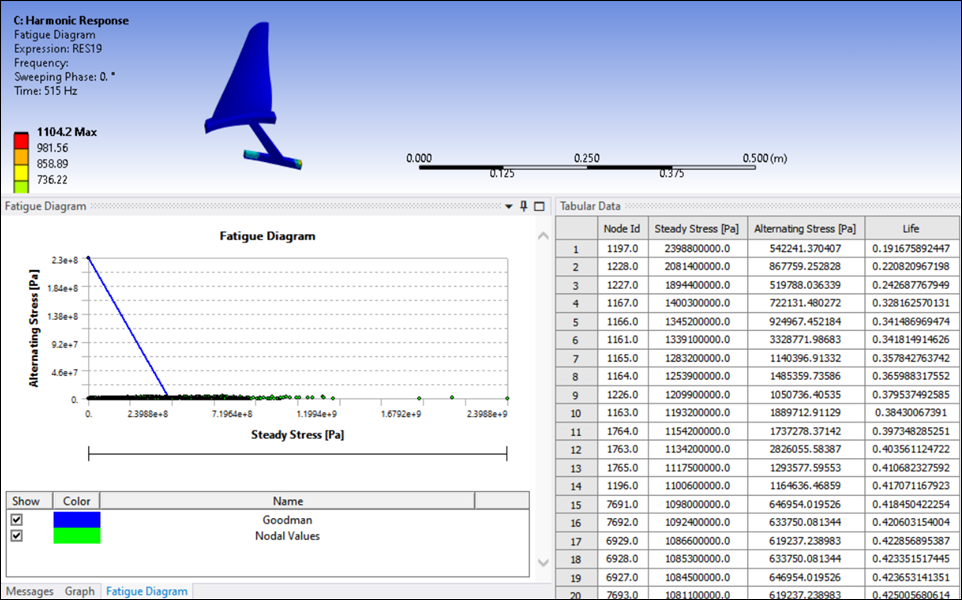
Key properties in the Details panel for the Fatigue Diagram post-processing object are as follows:
Set Stress Component to either Equivalent (Von-Misses) or Maximum Principal.
Define the Frequency Range for the alternating stresses. One or several frequencies may be picked to calculate the alternating stresses.
Set the Result Part to either Real, Imaginary, Amplitude, Maximum Values Across Phase Angle, or Phase Angle.
The static stresses come from the Static Structural analysis. If more than one load step is present in the Static Structural system, a different load step may be selected.
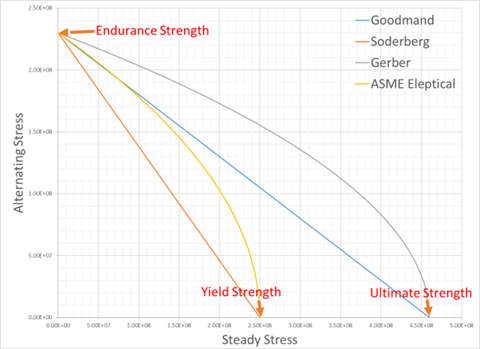
The material data strength creates the fatigue line and calculates the life. The available Mean Stress Theory options and their formulas are:
Goodman:

Soderberg:

Gerber:
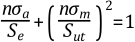
ASME Elliptical:
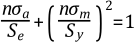
where n is the life, δα is the alternating stress, δm is the steady stress, Se is the endurance strength, Sy is the yield strength, and Sut is the ultimate strength.
The Mean Stress Theory can be set to Custom. You must define steady vs. alternating stress limit tabular data.
When the Fatigue Diagram is present, the *.inp file (format as below) is sent to the solver.
/batch
/NERR, ,  99999999, , OFF, 0
/UIS,MSGPOP,3
/NOPR
resume,file,db
/prep7
esel,s,type,,5
edele,all
allsel,all
fini
/post1
cycfiles,file,rst,file,rfrq
rsys,0
NSEL, S, NODE,,1 ,1
....
NSEL, S, NODE,,n ,n -> For all ids.
mystep = 2
set,1,mystep,,0
/cycexpand,,on
/cycexpand,,phaseang,CycArg
/graph,power
/output,post19-2,txt
prnsol,s
mystep = 3
set,1,mystep,,0
/cycexpand,,on
/cycexpand,,phaseang,CycArg
/graph,power
/output,post19-3,txt
prnsol,s
mystep = 4
set,1,mystep,,0
/cycexpand,,on
/cycexpand,,phaseang,CycArg
/graph,power
/output,post19-4,txt
prnsol,s
mystep = 5
set,1,mystep,,0
/cycexpand,,on
/cycexpand,,phaseang,CycArg
/graph,power
/output,post19-5,txt
prnsol,s
fini
Inputs are taken from the Details panel as follows:
The Result Part option is passed to the command as CycArg
if RP=='Amplitude': CycArg=360
if RP=='Imaginary':CycArg=90
if RP=='Maximum Values Across Phase Angle': CycArg='sweep'
if RP=='Phase Angle': CycArg= the value set
The From Frequency and To Frequency settings determine the steps used for alternating stresses. In the example above, From Frequency is the second frequency and the To Frequency is the fifth frequency available in the results file. The first mystep variable therefore corresponds to 2, and the last to 5.
mystep = step
set,1,mystep,,0
/cycexpand,,on
/cycexpand,,phaseang,CycArg
/graph,power
/output,post19-step,txt
prnsol,s