


Ansys HPC Platform Services (HPS) manages the execution of simulations and can be used as an alternative to the Remote Simulation Manager (RSM). For more information, see the Ansys HPC Platform Services Guide on the Ansys Help website.
To use HPS with the Explicit Dynamics system, create a new solve process setting as follows:
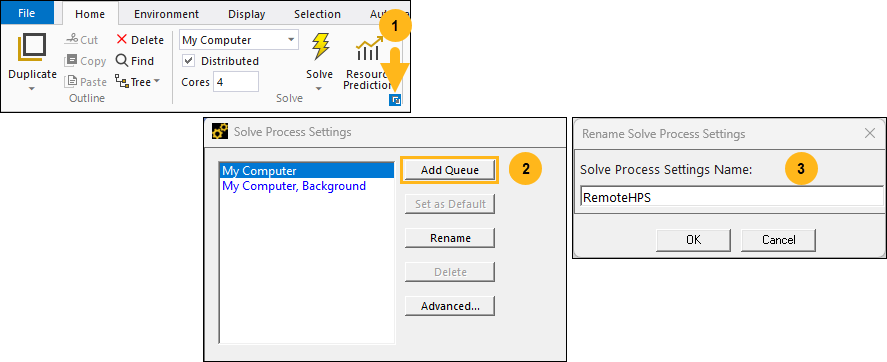
Go to the Solve group in the ribbon and open the Solve Process Settings. Then click and enter a Solve Process Settings Name.
Set Solution Execution Target to HPC Platform Services and then enter a URL, License and Credentials.
Ensure
/hpsis added to the end of the URL.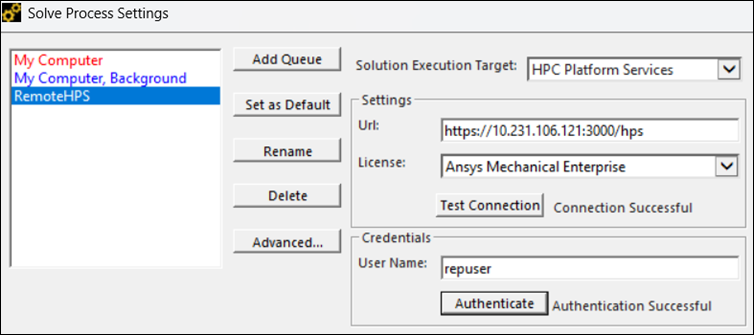
Click Test Connection and Authenticate to make sure the details are valid.
Select the new HPS solve process setting.
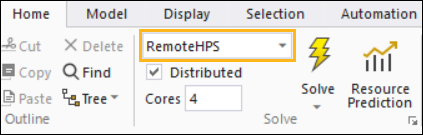
HPS is now used when solving a simulation using the Explicit Dynamics system.
When the solve has started, the necessary files are uploaded and sent to your defined destination (the URL). Pasting this URL into your web browser provides access to the Ansys HPC Manager Web App. In the web app, you can view all details regarding the remote location, jobs submitted, status of the jobs, files uploaded, result files, and so forth. For troubleshooting, check console_output.txt.
After the solve is completed, you can download the results using :
