


To build a binary extension from a scripted extension, do the following:
If the Binary Extension Builder was accessed from the menu, for Scripted Extension to Build, select the scripted extension to build as a WBEX file.
Choices include all scripted extensions in directories specified for Additional Extension Folders. This option is available when you click the gear icon in the graphic-based Extension Manager and in > > .
Both the extension name and version are shown to avoid confusion in case multiple versions of an extension are defined.
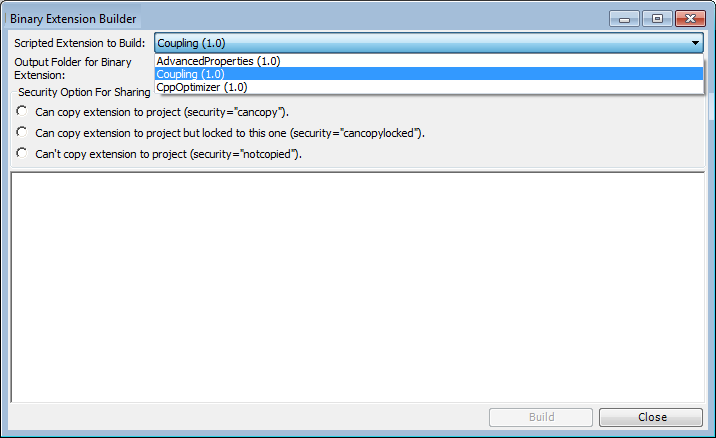
If the Binary Extension Builder is accessed using any other method, Scripted Extension to Build is not shown because the scripted extension is already selected.
For Output Folder for Binary Extension, identify the folder in which to output the WBEX file.
For Security Option For Sharing, select a security level.
Your selection specifies whether the extension can be saved with a Workbench project and, when that project is shared, whether the extension can be loaded with the shared project. The security level allows the developer of the extension to control how the extension is shared and used with various projects. Choices are:
Each time a user asks to save the extension with a project, the extension itself is copied into the project and consequently is available each time the project is opened. The extension can also be used with other projects.
The extension can be saved with a project, as with the previous option, but the use of the extension is limited to only this one project. If a user opens another project, the extension is not available.
The extension is not saved with the project and is not shared with other users of the project.
Note:Conditions that must be met to save the extension to the project follow this procedure.
You can send the extension separate from a project.
Once all options are specified, the button is enabled.
Click .
While the WBEX file is being built, the bottom part of the window displays build information.
Conditions for saving an extension with a project
To save an extension with a Workbench project, these conditions must be met:
In the Binary Extension Builder, the Security Option For Sharing option must be set to one of the following:
In > > , the Save Binary Extensions with Project option must be set to one of the following:
Copied but locked to the project
Always
In the Extension Manager, the extension must be configured as Load by default. For more information, see Configuring Extensions to Load by Default.
The following table summarizes whether the extension is saved with the project based on the options that are selected. In all cases, the Load by default option in the Extension Manager must be enabled during project save.
| Security Option for Sharing setting (abbreviated) in Binary Extension Builder | Save Binary Extensions with Project setting in > > | Extension saved with project? |
|---|---|---|
| cancopy | Never | No |
| cancopy | Copied but locked or Always | Yes |
| cancopylocked | Never | No |
| cancopylocked | Copied but locked or Always | Yes |
| notcopied | –- | No |
This next table summarizes extension loading behavior when a project with a saved extension is opened in Workbench.
| Security Option for Sharing setting (abbreviated) in Binary Extension Builder | Save Binary Extensions with Project setting in > > | Extension loading behavior when a project with a saved extension is loaded |
|---|---|---|
| cancopy | Copied but locked | Extension is loaded with the project only. |
| cancopy | Always | Extension is loaded and made available for other projects. |
| cancopylocked | Copied but locked or Always | Extension is loaded with the project only. |