


Introduction
The Ansys Thermal Desktop node allows you to use Ansys Thermal Desktop project files (*.dwg) within an optiSLang workflow. When you open a file in the node, the parameters and results are displayed.
Setup
A few steps are required to prepare the Thermal Desktop project for a variational study with optiSLang.
This node varies Symbols and Symbols in override lists as input parameters and consumes SINDA Registers as responses. Symbols in override lists correspond to case sets. By default, a case set will be considered to run if it is listed under the group "optiSLang" or has a name with the prefix "osl_". Additional case sets will be recognized if they are listed in the settings file casesets2run.tdosl, which must be located in the same directory as the Thermal Desktop project file.
Uncheck the "Reset Symbols To Original Values" check box on the Dynamic tab in a case set dialog in Thermal Desktop.
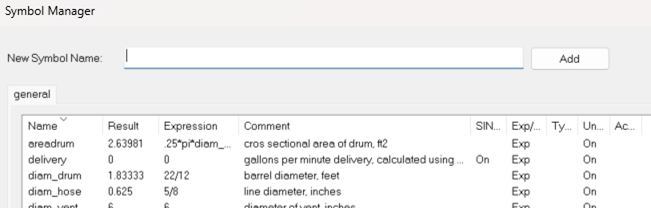
Symbols in Symbol Manager in Thermal Desktop
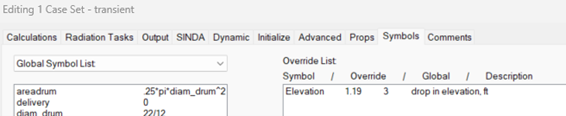
Symbols in override lists in case set settings in Thermal Desktop
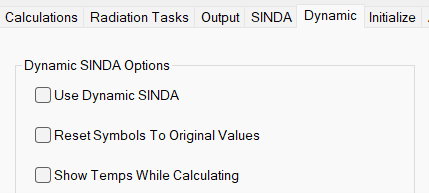
Uncheck the "Reset Symbols To Original Values" in case set settings in Thermal Desktop
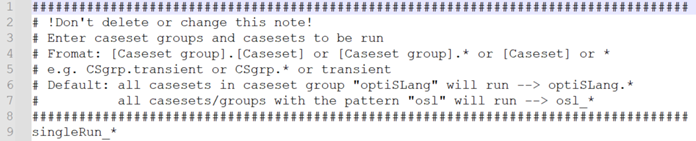
Content of casesets2run.tdosl,
e.g., the additional entry in line 9 singleRun_* will run
all case sets with this prefix.
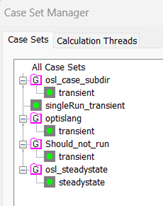
Example for case set to run: 4 of 5 case set fulfill
the pattern ("optiSLang"; "osl_"; user defined
"singleRun_*") besides the case set in the case set group
"Should_not_run"
All registers from the save file and Symbols as SINDA Registers will be exposed as outputs in optiSLang. The Thermal Desktop project's referred case sets must be solved before loading into the node.
If "Run In User Defined Directory" is set in Thermal Desktop, a relative path to the save file will be recognized.
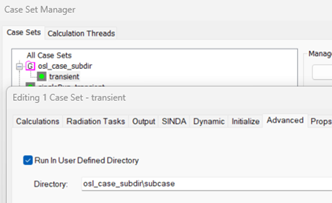
Relative path to Thermal Desktop results
The related files, including the thermophysical properties database (TdThermo.tdp) and the optical properties database (RcOptics.rco), will be automatically copied into each design folder if they are present in the same directory as the Thermal Desktop project file.
Additional information is available in the Thermal Desktop help.
Parameters
This node extracts inputs from the parameterized Thermal Desktop drawing file. Defined Symbols in Symbol Manager and Symbols in override lists that are included in case sets will be presented as inputs in optiSLang. The inputs can be recorded as parameters in optiSLang for further parametric analysis.
In the dialog, the expression used from Thermal Desktop is shown under Value, while Type provides the interpretation of this value type. Parameters must be either scalar or real. The expected value type used in Thermal Desktop is indicated under TD Type.
Any Symbol comments made by users in the Thermal Desktop file will be listed under Description. Name is a unique identifier for that parameter. Input refers to the corresponding name used in Thermal Desktop.
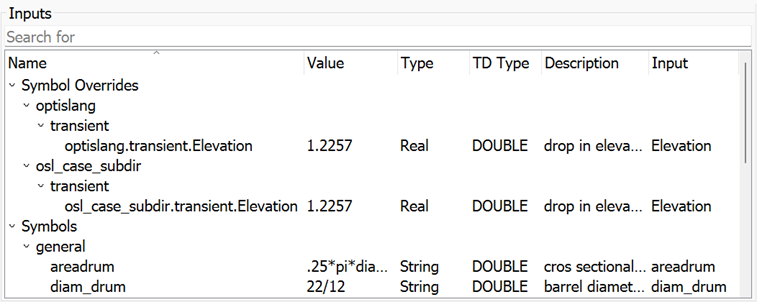
Node dialog - input list
Responses
Responses will be extracted from the available list of SINDA Registers found in the save file, along with the Symbols tracked that are marked as SINDA Registers in the Thermal Desktop Symbol Manager. Any network responses (for example, temperature of node MAIN.10) or other factors (for example, the velocity of a valve stem from an equation of motion) must be available as a register value, and registers must chosen to be saved in the save file.
If the results register varies within the Thermal Desktop case, often as a function of time, this will be extracted as XY data from a Thermal Desktop save file of a corresponding case set. Outputs must be scalar as real type or signals as XYData type. These outputs can be registered as responses in the node dialog.
Name provides a unique name for each response regarding the relative path to the save file location and the SINDA Register name itself. By registering an output as a response in the node dialog, the "\" changes into "_".
The Description displays the Symbol comment from Thermal Desktop. Output is the corresponding name used in Thermal Desktop.
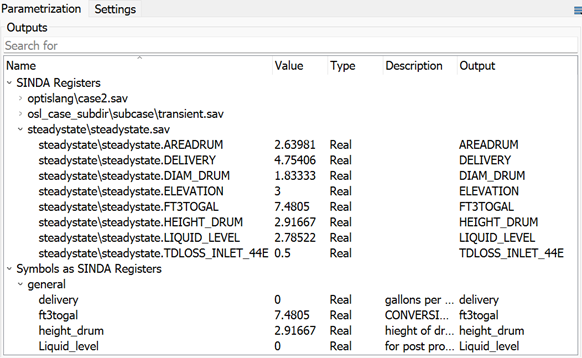
Node dialog - output list
Settings
This node provides the following settings:
| Name | Installation Default | Description |
|---|---|---|
| openTD module path | OpenTDv241.dll | File path to .NET library for OpenTD API |
| openTD results module path | OpenTDv241.Results.dll | File path to .NET library for OpenTD Results API |
| File name for caseset-to-run file | casesets2run.tdosl | File name searcher to consider the introduction of an additional case set to be executed |
| Use reference file | False | When selected, uses the reference dwg file to be executed. Note: Run Options -- Maximum in parallel must be 1. |
| Create distinct user defined directory | False | When selected, creates additional unique design directories to preserve results. |
Run Options
This node has general Run Options. The number of supported options is individual for each node.
Parallelization
By default, each design opens and executes in a single Thermal Desktop instance (design per execution equals 1). If design per execution >1, this number of designs will be sent to a Thermal Desktop instance and executed in series. This can be combined with Run Options: Maximum in parallel >1.
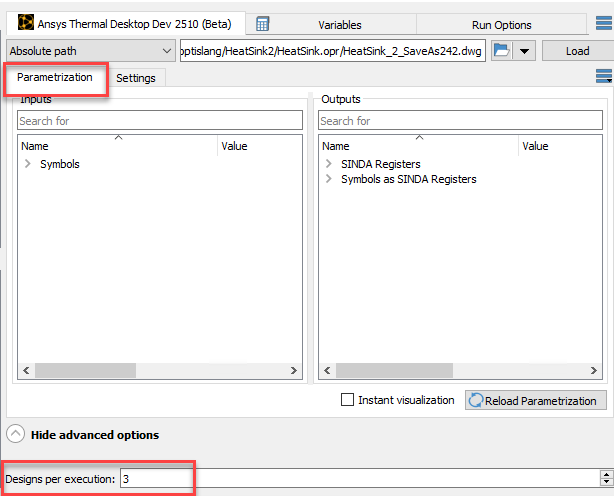
Advanced Options - Designs per execution
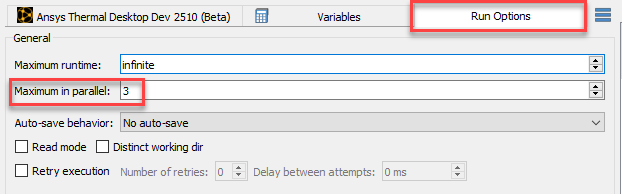
Run Options - Maximum in parallel
Operating System
Windows
Supported Versions
See the Supported Versions table.
Troubleshooting
| Issue | Solution |
|---|---|
| Automatic copying of TdThermo.tdp and RcOptics.rco doesn't work if they are renamed or in relative paths to the TD file | solution 1: renamed and/or relative paths > copying into the design folder before (e.g., with a batch node) solution 2: use absolute paths to the reference files |
| Input parameters reset to the reference value | Uncheck the "Reset Symbols To Original Values" check box on the Dynamic tab in a case set. |
Limitations
Linux is not supported.
The latest installed Thermal Desktop version must be used.
As default, OpenTDv241 must be installed along with Thermal Desktop.
Arrays are not supported as inputs.
Symbol names cannot have dots.
Special characters are not fully supported in Thermal Desktop UserDirectory names.