


This loading event supports hybrid loading for the time domain case. The loading event provides an alternative way of creating a stress (or strain) time history through a combination of different types of load provider.
To specify a loading event, set the Type property to and then click under Loading Event to add any type of load (, , , or ) to the loading event:
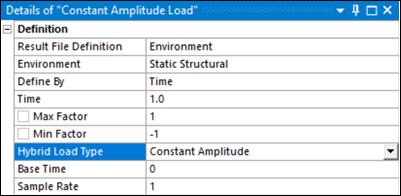
The key difference between the and the loading event is that for loading the stress histories from the child loads are superimposed rather than considered in sequence. This provides a very flexible way of creating stress histories, and allows, for example, a cycle simulating a mechanical load to be superimposed on a slow thermal transient.
The following validation checks are performed by the hybrid loading event:
Only one temperature load can be included.
If a temperature load is included, then at least one other load provider must also be included.
If the hybrid load type is , two additional properties appear:
- Base Time
This defines the time value of the first data point.
- Sample Rate
The constant amplitude load provider may be considered similar to a time series loading that only generates two data points. The first point is the maximum value and the second point is the minimum value. The time value of the first data point will be equal to the Base Time property. The time value of the second data point will be equal to the Base Time + 1/Sample Rate.
If the hybrid load type is , one additional property appears:
- End Time Increment
This defines the time gap after the last data point before the first one would appear again if the history were repeated.
If the hybrid load type is , the environment selected must be a physics type. The temperature load considers the .rth file of the selected analysis.
The purpose of the load is to provide a temperature-time history that can be used as input for a high-temperature fatigue calculation. A Temperature load must be a child of a load provider, because the temperatures are used in conjunction with another loading that defines the stress or strain. The load mapping interface for the Temperature load is very similar to that of the load provider, requiring selection from a list of available temperature-time steps.
You must defined the Steps and Time lists through the tabular data. The Steps sets the list of FE Temperature steps to be used. The Time sets the value for each FE temperature step.
The TemperatureSelection property, which defines how to process the temperature history when Mode is set to , defaults to . This means that the overall time history maximum temperature is applied as the constant temperature for all cycles in the history.
When Mode is set to , which assumes that the temperature distribution in the model is not time-varying, only one temperature case should be selected.