


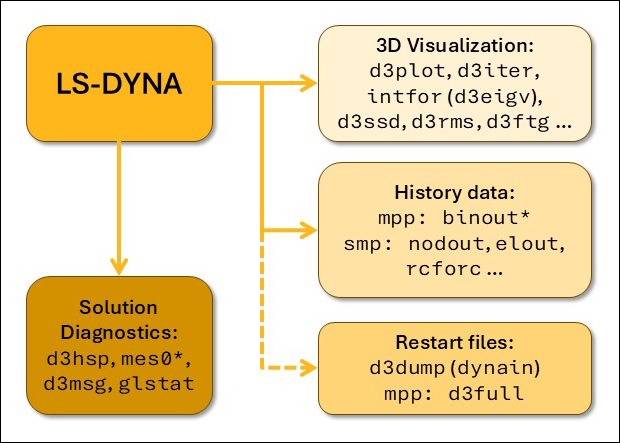
Results from an LS-DYNA analysis are written in a set of separate output files. See the following figure for an overview. The solution diagnostics files (d3hsp, mes*, glstat) are in ASCII format and are useful for tracking the progress of the solution. The files for 3D visualization are in binary format and can be opened using LS-PrePost or META. The main results file for visualizing deformation, stresses, and other solution results is the d3plot file (or d3eigv from eigenvalue analyses). Historical data for curve plotting outputs is available as binary files (binout*) from the Massively Parallel Processing (MPP) version of LS-DYNA or as a family of ASCII files (nodout, elout, rcforc , ...) from the Shared Memory Parallel processing (SMP) version of LS-DYNA.
Files for controlling the output from implicit analyses are appended to the present package. The amount of output provided should be sufficient for most analysis types, but the user is advised to study the contents of the include files and check if some special output type required for a particular analysis type is missing.
In the file database_cards_static.key, output frequency is set very high, in order to ensure output after each time step of the analysis. In the file database_cards_dynamic.key, output frequency is reduced in order to get output at times that makes physical sense.
Note that the time scale used in this case is ms (10-3 s). If other unit systems are used, you must modify the output frequencies to sensible values.
By default, LS-DYNA will output element results (stresses, strains) averaged at element centroids. Output of element integration point quantities is discussed in Element Integration Point Output for 3D Post-processing. Contact output is discussed in Contact Output.
For analyses in R10.1 or prior, the include file database_cards_before_R102.key should be used. The reason for this is related to contact output as described in Contact Output.