


The Bending Moment (BM) /Shear Force (SF) calculation utility is activated from the Model Visualisation Window. To start this facility select Ship Bending/Shear from the Select menu.
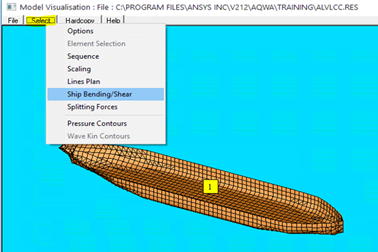
This facility allows you to calculate the Bending Moment and Shear forces about/along the X, Y, or Z axis of your model.
The utility will calculate these forces either under static (still water) conditions or with a given sea state defined by the user.
In order for the AGS to calculate the necessary forces you must follow these steps:
Run your model in Aqwa-Line which will create the file, *.POT, containing potential for each wetted element. The .POT file is needed for the SF & BM calculation.
Define the Mass Distribution along the vessel. This is input into the Aqwa Graphical Supervisor in the form of an .MSD file. Note that the total mass and the resolved LCG of this mass must equal that calculated by Aqwa-Line. Failure to do this will cause the AGS to attempt to resolve the residual forces. However this method may result in non-zero residual forces causing erroneous results in the SF and BM. Note that the .POT, .RES, and the .MSD files must reside in the same directory.
Open the .RES file within the AGS and select Ship Bending/Shear from the Select menu of the Model Visualisation Window.
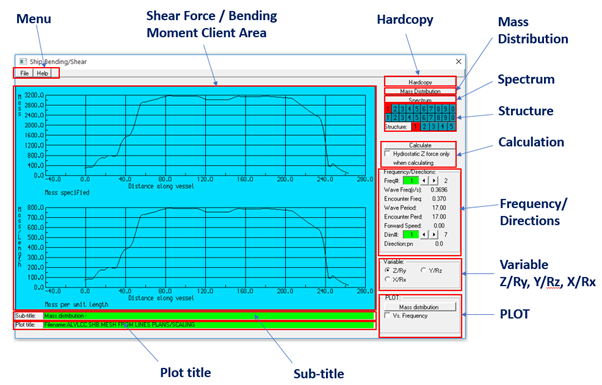
Ship Bending/Shear window consists of following components:
Spectrum - Choose the wave spectrum you wish to use.
Structure - Only one structure may be used for the BM/SF calculation.
Sub-title -The subtitle text box gives a description of the displayed plot. You may enter your own description.
Plot title - The Plot title text box gives a description of the analysis file name. You may enter your own description.