


The Aqwa suite of programs requires a data (.DAT) file to perform analysis. The first two decks of the data file define the structure's mesh within the Fixed Reference Axis (FRA). The AGS has a mesh generation utility, but it is only available for ship/boat models. However, Workbench can be used to create all types of Aqwa models.
Note: You should not rely on models created from a mesh. Always check an automatically generated model for errors before proceeding with analysis.
The mesh generation facility allows you to generate an Aqwa ship/boat model automatically from a user specified lines plan (.LIN) file. The mesh is then saved to a Aqwa data file (.DAT) as a single structure which can then be enhanced by the user for Aqwa analysis. This data file contains information for the structure definition and centre of gravity position only.
The mesh generation facility also allows you to convert an existing Aqwa restart file (.RES) to an Aqwa data (.DAT). Note that only structure information will be saved.
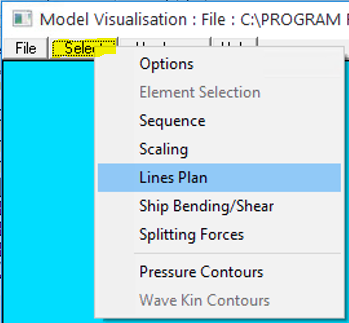
To activate Mesh Generation mode select Lines Plan from the Select menu on the Model Visualisation menu bar.
The Lines Plan Mesh Generation dialog box will then appear.
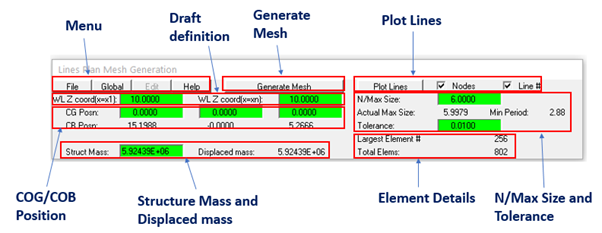
This dialog box has the following components.
Menu Bar - File, Global, Help, and Edit
Draft Definition - Input of draft at vessel extremities
CG/CB Position - Input of Centre of Gravity position
N/Max Size / Tolerance - Control the size of the elements
Plot Lines (Nodes / Line#) - Plot the lines plan sections
Structural Mass - Displays displaced mass & structural mass
Generate Mesh - Create mesh from lines plan
Element details - Description of max size, largest element and total number of elements
Tip:
The lines plan sections and the mesh's screen orientation may be manipulated within the client area by using the various utilities within the Model Visualisation window. These utilities are: View Centre, View Angle, Zoom, Move Structure,Command, Element Style, Numbering, Features.