


The Template Editor allows you to convert a select template into a JSON file and save it. It also allows you to load a JSON file to rebuild a template from the JSON format.
Export Templates to JSON
In the Report templates list, select a template.
Note: If you select a sub-template under a root template, the entire root template will be exported.
From the menu bar, select > .
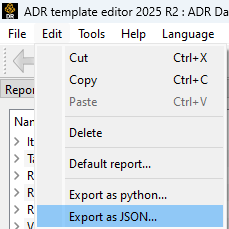
In the dialog, browse to the location where you want to save the JSON file.
In the File name field, enter a name for the file.
Click .
The resulting JSON file is read-only, and is formatted like the following:
{
            "Template_0": {
                "name": "A",
                "report_type": "Layout:basic",
                "tags": "",
                "item_filter": "",
                "params": {},
                "sort_selection": "",
                "parent": null,
                "children": [
                    "Template_1",
                    "Template_2"
                ]
            },
            "Template_1": {
                "name": "B",
                "report_type": "Layout:basic",
                "tags": "",
                "item_filter": "",
                "params": {},
                "sort_selection": "",
                "parent": "Template_0",
                "children": [
                    "Template_3"
                ]
            },
            "Template_3": {
                "name": "D",
                "report_type": "Layout:basic",
                "tags": "",
                "item_filter": "",
                "params": {},
                "sort_selection": "",
                "parent": "Template_1",
                "children": []
            },
            "Template_2": {
                "name": "C",
                "report_type": "Layout:basic",
                "tags": "",
                "item_filter": "",
                "params": {},
                "sort_selection": "",
                "parent": "Template_0",
                "children": []
            }
        }
Load a JSON File to Rebuild the Template
From the menu bar, select > .
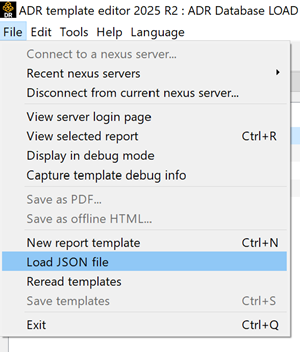
In the dialog, browse to the JSON file you want to load, select the file, and click .
As long as the JSON file is valid, a new template is added to the Report templates list.
If the root name of the loaded report template conflicts with an existing root name in the list, a warning message is displayed.
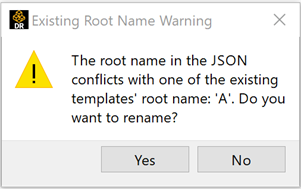
To avoid name duplication, click and rename the template. If you click , multiple templates with the same name are shown in the list.