


Ansys AVxcelerate Sensors Simulator Overview
Ansys AVxcelerate Sensors Simulator is a key component of a comprehensive solution for ADAS closed loop simulation. More specifically, it represents the calculation core of the solution and is responsible for physics-based sensor simulation. In order to operate, Ansys AVxcelerate Sensors Simulator communicates with different software and resources.
License Capabilities
The Ansys AVxcelerate PrepPost (or Ansys AVxcelerate PrepPost workgroup) license gives access to the Sensor Data Preparation within the AVxcelerate Asset Preparation license.
In addition to the Ansys AVxcelerate Solve (or Ansys AVxcelerate Solve workgroup) license required to start Ansys AVxcelerate Sensors Simulator, you need either:
- one license add-on for each sensor to simulate:
- Ansys AVxcelerate Optical Camera add-on to simulate a camera sensor,
- Ansys AVxcelerate Thermal Camera add-on to simulate thermal camera,
- Ansys AVxcelerate Lidar add-on to simulate a LiDAR sensor,
- Ansys AVxcelerate Radar add-on to simulate a Radar
sensor. Note: One sensor can be simulated per purchased add-on. For instance, if you want to simulate multiple LiDAR sensors in one simulation, you need multiple Lidar add-ons.
- an Ansys AVxcelerate Sensor add-on Workgroup license defining the total number of sensors that can be simulated.
Ansys AVxcelerate Sensors Simulator Workflow
Ansys AVxcelerate Sensors Simulator allows you to simulate a configuration of sensors in a physics-based environment in which you can integrate your own policies and control laws.
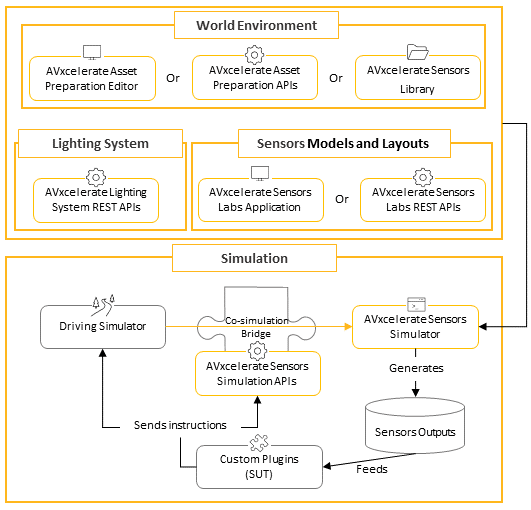
Data preparation of the world environment
Prepare the data set to be included in the simulation, then match the track and assets files you prepared in AVxcelerate Asset Preparation or via AVxcelerate Asset Preparation APIs with their corresponding driving simulator counterpart files.
AVX input data are provided in the AVxcelerate Sensors Library, or in the AVxcelerate Sensors Library for LPE (beta).
When installing the Ansys AVxcelerate Sensors solution, you must select the library to install according to the rendering engine that will be used for the simulation of camera sensors.- The resources provided in the AVxcelerate Sensors Library are meant to be used when running camera sensor simulations with the default rendering engine. The resources provided in the AVxcelerate Sensors Library for LPE (beta) are not compatible with the default rendering engine.
- The resources provided in the AVxcelerate Sensors Library for LPE (beta) are required when running camera sensor simulation with the LPE rendering engine. The resources provided in the AVxcelerate Sensors Library are not compatible with the LPE rendering engine.
Corresponding driving simulator resources are delivered in the AVxcelerate Sensors Library for CarMaker and AVxcelerate Sensors Library for SCANeR.
For more details, refer to Asset Data Preparation Highlights.
Sensor Models and Layouts configuration
Create sensors models, then configure the sensor layout to attach to the ego vehicle with the AVxcelerate Sensor Labs or AVxcelerate Sensor Labs REST APIs.
For more details, refer to Sensors Overview.
Lighting System
Define the lighting system of the ego-vehicle using the Lighting System REST APIs.
Simulation configuration
Set the sensors simulation configuration and resources as well as the simulation process arguments. Define the driving simulation scenario in the driving simulator: scenario in AVSimulation SCANeR™ or TestRun in CarMaker.
Leverage the AVxcelerate Sensors Simulator APIs to develop your custom plugins in order to integrate the System Under Test (SUT) in the simulation loop.
For more details, refer to Simulation Highlights.
Simulation
Thanks to the Co-simulation bridge, running the simulation in the driving simulator generates sensor outputs.
For more details about simulation configuration and simulation, refer to Simulation Highlights.
During the simulation, the sensors generate results which can then be used as inputs by your custom plugins.