


The Mechanical application enables you to import supported finite element data types from External Model and represents them natively through various imported objects in the tree. In addition, imported databases almost always contain additional commands that are not natively supported by the application. Mechanical exposes these commands (along with the commands natively processed in Mechanical) through the ACT extensions and console window. The following APIs enable you to access the underlying commands repository for a file specified in External Model.
When you open Mechanical independently:
commands = ExtAPI.DataModel.Project.Model.GetFECommandsRepository("External Model", "File1");
When you open Mechanical from Workbench:
commands = ExtAPI.DataModel.Project.Model.GetFECommandsRepository("Setup", "File1");
Users familiar with ACT APIs for Ansys Mechanical
will notice that the command GetFECommandsRepository on the
Model object provides access to the commands repository. The two
arguments ("Setup" and "File1") specify the source External
Model Component Id and "File Identifier" in
the External Model Component.
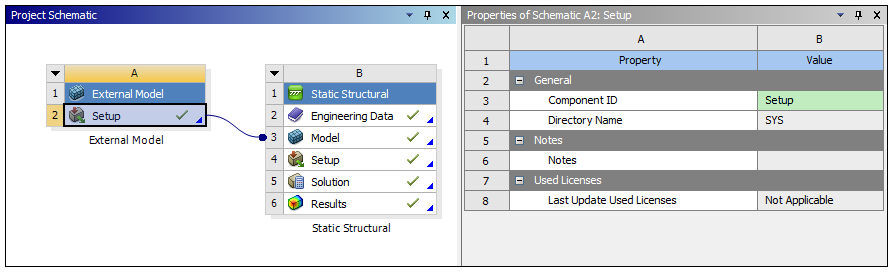
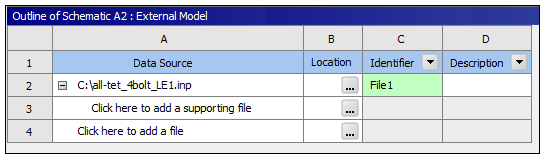
The return object commands is an instance of the interface ICommandRepository.
Once user has access to the commands database, you can access:
Processed Commands: Commands processed and natively represented in Mechanical.
Unprocessed Commands: Everything other than Processed Commands.
User can access the unprocessed commands names using the combination of following commands:
unprocessedCmdNamesCount = commands.GetCommandNamesCount(Ansys.ACT.Automation.Mechanical.FE.CommandsType.UnProcessed);
And...
unprocessedCmdName = commands.GetCommandName(Ansys.ACT.Automation.Mechanical.FE.CommandsType.UnProcessed, index);
As you might notice, the command GetCommandNamesCount on ICommandRepository provides the count of the command names
of type specified as first argument:
Ansys.ACT.Automation.Mechanical.FE.CommandsType.UnProcessed
Or...
Ansys.ACT.Automation.Mechanical.FE.CommandsType.Processed
And the command GetCommandName provides the command name given
the type and index (index is 1 based, therefore, if the
unprocessedCmdNamesCount = n, the valid index value are
(1,n)).
Given a command name, user can access all instances of a command with a given name as:
namedCommands = commands.GetCommandsByName(commandName);
The return value namedCommands is an instance of the interface
ICommandColl. A command can be accessed from the
namedCommands as:
namedCommand = namedCommands.Item(index);
The index argument is 1 based, therefore valid index value are
(1,namedCommands.Count()))
The return value namedCommand is a derived instance of the
interface ICommand, i.e. the namedCommand
instance exposes the methods available on the ICommand
interface:
Name(): Command name
Index(): 1 based global index of the command in command repository
And any additional methods exposed the specific instance of the command. For example,
if the namedCommand is an instance of
ICECommand (a type of processed command from CDB file), then the
following additional methods are available:
Nce(): Constraint Equation ID
Constant(): Constant Term
TermCount(): Number of Terms
GetTerm(int index): Term at Index
Similarly, if the namedCommand is an instance of
IGenericCommand (unprocessed command from CDB file), then the
following additional methods are available:
ArgumentCount(): Number of arguments
GetArgument(int index): Argument at index
If LS-DYNA models are being imported, the contents of the
namedCommand can be found using
FieldValueMap(). For more details, see the example below:
from System.Collections.Generic import Dictionary

commands = ExtAPI.DataModel.Project.Model.GetFECommandsRepository("Setup", "File1");

namedCommands = commands.GetCommandsByName("*EXAMPLE_CARD")
list = []
for command in namedCommands :
    map = command.FieldValueMap()
    begin = map.Begin()
    clrdict = Dictionary[str,object]()
    for i in range(0,10):
      clrdict.Add(begin.Name(),begin.Value())
      begin.Increment()
    list.Add(clrdict)

print list[0]
Refer to the External Model CDB Commands, External Model NASTRAN Commands, and the External Model ABAQUS Commands sections for all the available processed and unprocessed commands from CDB, NASTRAN, and ABAQUS databases.
In addition, you can traverse the command repository by going to the next and previous commands in the database using the following APIs:
prevCommand = commands.GetCommandByIndex(currentCommand.Index()-1);
nextCommand = commands.GetCommandByIndex(currentCommand.Index()+1);
Given the information provided in the above section, let's take a look at some examples.
CBD File Examples
The following examples describe how to query the command repository.
commands = ExtAPI.DataModel.Project.Model.GetFECommandsRepository("Setup", "File1")
Example: List All Command Names
This example enables you to generate a listing all command names in the command repository.
commandType = Ansys.ACT.Automation.Mechanical.FE.CommandsType.All
commandCount = commands.GetCommandNamesCount(commandType)
commandsNames = []
for iCommand in range(0, commandCount):
	commandsNames.append(commands.GetCommandName(commandType, iCommand+1))
commandsNames
Example: List All Nodes
This example enables you to generate a listing all nodes in the command repository.
NBLOCK,6,SOLID,     430,     10
(3i9,6e21.13e3)
      421        0        0 6.3203350000000E+004-4.2985880000000E+004 6.3500000000000E+004
      422        0        0 6.1696900000000E+004-4.5619000000000E+004 6.3500000000000E+004
      423        0        0 5.9365700000000E+004-4.7562160000000E+004 6.3500000000000E+004
      424        0        0 5.6517810000000E+004-4.8605830000000E+004 6.3500000000000E+004
      425        0        0 5.3482670000000E+004-4.8603130000000E+004 6.3500000000000E+004
      426        0        0 5.0634300000000E+004-4.7562160000000E+004 6.3500000000000E+004
      427        0        0 4.8295410000000E+004-4.5625390000000E+004 6.3500000000000E+004
      428        0        0 4.6795660000000E+004-4.2986070000000E+004 6.3500000000000E+004
      429        0        0 4.6250000000000E+004-4.0000000000000E+004 6.3500000000000E+004
      430        0        0 4.6795660000000E+004-3.7013930000000E+004 6.3500000000000E+004
N,R5.3,LOC,       -1,

/*Commands*/
nodeIds = []
nblockCommands = commands.GetCommandsByName("NBLOCK")
nblockCount = nblockCommands.Count
for iNBlock in range(0, nblockCount):
	nblock = nblockCommands[iNBlock+1]
	nodeCount = nblock.NodeCount()
	for iNode in range(0, nodeCount):
		node = nblock.GetNode(iNode+1)
		nodeIds.append(node.Id())
nodeIds

/*Output*/
[421, 422, 423, 424, 425, 426, 427, 428, 429, 430]
Example: Extract Analysis Settings
This example enables you to extract all Analysis Setting in the command repository.
ANTYPE, 2
MODOPT,LANB,     6,  0.00000000    ,  0.00000000    ,     0, 0,  0.00000000    , 0

/*Commands*/
antypeCommands = commands.GetCommandsByName("ANTYPE")
if(antypeCommands.Count > 0):
    antypeCommand = antypeCommands[1]
    if(antypeCommand.ArgumentCount() > 0):
        antype = antypeCommand.GetArgument(1)
        print antype
        if(antype == "2"):
            modoptCommands = commands.GetCommandsByName("MODOPT")
            if(modoptCommands.Count > 0):
                modoptCommand = modoptCommands[1]
                for iArg in range(0, modoptCommand.ArgumentCount()):
                    print modoptCommand.GetArgument(iArg+1)

/*Output*/
2
LANB
6
0.00000000
0.00000000
0
0
0.00000000
0
ABAQUS File Example
This example enables you to generate a listing all nodes in the command repository.
/*Input*/
*NODE, NSET=nset_csys2
       421, 6.320335E+01,-4.298588E+01, 6.350000E+01
       422, 6.169690E+01,-4.561900E+01, 6.350000E+01
       423, 5.936570E+01,-4.756216E+01, 6.350000E+01
       424, 5.651781E+01,-4.860583E+01, 6.350000E+01
       425, 5.348267E+01,-4.860313E+01, 6.350000E+01
       426, 5.063430E+01,-4.756216E+01, 6.350000E+01
       427, 4.829541E+01,-4.562539E+01, 6.350000E+01
       428, 4.679566E+01,-4.298607E+01, 6.350000E+01
       429, 4.625000E+01,-4.000000E+01, 6.350000E+01
       430, 4.679566E+01,-3.701393E+01, 6.350000E+01

/*Commands*/
nodeIds = []
nodeKeywords = commands.GetCommandsByName("NODE")
nodeKeywordCount = nodeKeywords.Count
for iNodeKeyword in range(0, nodeKeywordCount):
	nodeKeyword = nodeKeywords[iNodeKeyword+1]
	arguments = nodeKeyword.Arguments()
	for iArg in range(0, arguments.Count()):
		arg = arguments.Item(iArg+1)
		print arg.Key()+"="+arg.Value()
	datalines = nodeKeyword.DataLines()
	for iLine in range(0, datalines.Count()):
		dataline = datalines.Item(iLine+1)
		nodeIds.append(dataline.Item(1))
nodeIds

/*Output*/
NSET=nset_csys2
[421, 422, 423, 424, 425, 426, 427, 428, 429, 430]
NASTRAN File Examples
Example: Print Case Control Section
This example enables you to print the case control section in the command repository.
/*Input*/
CEND
TITLE = MSC.Nastran job created on 01-May-09 at 15:46:33
ECHO = NONE
MPC = 101107
SUBCASE 1
   TITLE=REDESIGNED EAI PAN WITH PRODUCTION LOADS
   SUBTITLE=VIBE_FX
   SPC = 2
   LOAD = 101108
   DISPLACEMENT(PLOT,SORT1,REAL)=ALL
   SPCFORCES(SORT1,REAL)=ALL
   MPCFORCES(SORT1,REAL)=ALL
   STRESS(PLOT,SORT1,REAL,VONMISES,BILIN)=ALL
   FORCE(PLOT,SORT1,REAL,BILIN)=ALL
SUBCOM 2
   TITLE=REDESIGNED EAI PAN WITH PRODUCTION LOADS
   SUBTITLE=COMBINED VIBE LOADS (PRODUCTION)
   LABEL=COMBINE VIBE PRODUCTION WITH AXIAL LINK
   SUBSEQ = 1.,
            1.,
            1.,
            1.,
            1.,
            1.
   DISPLACEMENT(PLOT,SORT1,REAL)=ALL
   SPCFORCES(SORT1,REAL)=ALL
   MPCFORCES(SORT1,REAL)=ALL
   STRESS(PLOT,SORT1,REAL,VONMISES,BILIN)=ALL
   FORCE(PLOT,SORT1,REAL,BILIN)=ALL
BEGIN BULK

/*Commands*/
commands = ExtAPI.DataModel.Project.Model.GetFECommandsRepository("Setup", "File1")
caseControlCommands = commands.GetCommandsByName("CASE")
caseCount = caseControlCommands.Count
offset = ""
for iCaseCmd in range(0, caseCount):
	caseCmd = caseControlCommands[iCaseCmd+1]
	text = caseCmd.Text()
	if (text.startswith("SUBCASE") or text.startswith("SUBCOM")):
		print text
		offset = "\t"
	else:
		print offset + text

/*Output*/
TITLE = MSC.Nastran job created on 01-May-09 at 15:46:33
ECHO = NONE
MPC = 101107
SUBCASE 1
TITLE = REDESIGNED EAI PAN WITH PRODUCTION LOADS
SUBTITLE = VIBE_FX
SPC = 2
LOAD = 101108
DISPLACEMENT(PLOT ,SORT1,REAL)=ALL
SPCFORCES(SORT1 ,REAL)=ALL
MPCFORCES(SORT1 ,REAL)=ALL
STRESS(PLOT ,SORT1,REAL,VONMISES,BILIN)=ALL
FORCE(PLOT ,SORT1,REAL,BILIN)=ALL
SUBCOM 2
TITLE = REDESIGNED EAI PAN WITH PRODUCTION LOADS
SUBTITLE = COMBINED VIBE LOADS (PRODUCTION)
LABEL = COMBINE VIBE PRODUCTION WITH AXIAL LINK
SUBSEQ = 1.,1.,1.,1.,1.,1.
DISPLACEMENT(PLOT ,SORT1,REAL)=ALL
SPCFORCES(SORT1 ,REAL)=ALL
MPCFORCES(SORT1 ,REAL)=ALL
STRESS(PLOT ,SORT1,REAL,VONMISES,BILIN)=ALL
FORCE(PLOT ,SORT1,REAL,BILIN)=ALL
Example: List All Bushings
This example enables you to generate a listing all CBUSH elements in the command repository.
/*Input*/
BEGIN BULK
CBUSH    5344    1       15301   15307                           3
        .5
CBUSH    5345    1       15302   15312                           3
        .5
CBUSH    5346    1       15303   15311                           3
        .5
CBUSH    5347    1       15304   15310                           3
        .5
CBUSH    5348    1       15305   15309                           3
        .5
CBUSH    5349    1       15306   15308                           3
        .5

/*Commands*/
commands = ExtAPI.DataModel.Project.Model.GetFECommandsRepository("Setup", "File1")
cbushCommands = commands.GetCommandsByName("CBUSH")
cbushCount = cbushCommands.Count
for iCBushCmd in range(0, cbushCount):
	cbushCmd = cbushCommands[iCBushCmd+1]
	args = []
	args.append(cbushCmd.Name())
	argCount = cbushCmd.ArgumentCount()
	for iArg in range(0, argCount):
		args.append(cbushCmd.GetArgument(iArg+1))
	print args

/*Output*/
['CBUSH', 5344, 1, 15301, 15307, 0.0, 0.0, 0.0, 3, 0.5, 0, 0.0, 0.0, 0.0]
['CBUSH', 5345, 1, 15302, 15312, 0.0, 0.0, 0.0, 3, 0.5, 0, 0.0, 0.0, 0.0]
['CBUSH', 5346, 1, 15303, 15311, 0.0, 0.0, 0.0, 3, 0.5, 0, 0.0, 0.0, 0.0]
['CBUSH', 5347, 1, 15304, 15310, 0.0, 0.0, 0.0, 3, 0.5, 0, 0.0, 0.0, 0.0]
['CBUSH', 5348, 1, 15305, 15309, 0.0, 0.0, 0.0, 3, 0.5, 0, 0.0, 0.0, 0.0]
['CBUSH', 5349, 1, 15306, 15308, 0.0, 0.0, 0.0, 3, 0.5, 0, 0.0, 0.0, 0.0]